Claude Is Giving Away $100 to $250: How to Claim It Before It Closes

Anthropic has moved Claude Code cloud sessions out of closed preview and is giving current subscribers a one-time credit — $100 on Pro and $250 on Max. Claim it by October 7 and spend it by November 4.
Anthropic has moved Claude Code cloud sessions out of closed preview and is giving current subscribers a one-time credit: $100 on Pro and $250 on Max. Claim it by October 7, spend it by November 4. Below: what this is, who qualifies, and how to get it.
---
If you're short on time: five points
1. The credit is one-time: $100 on Pro, $250 on Max. One per account.
2. Claim by October 7, 11:59 PM Pacific Time. Any unused balance expires on November 4, also at 11:59 PM PT.
3. Only for those whose subscription was active on September 23 — the day the promotion launched.
4. You need GitHub connected — you can't run a cloud session without it.
5. It only applies to cloud sessions. It doesn't work with Projects or Routines.
---
What actually happened
On September 23, Anthropic announced that Claude Code cloud sessions had graduated from research preview into a regular feature of paid plans.
What a cloud session is. Normally, Claude Code runs on your computer: you launch it in a terminal, it reads your project files, edits code. Close the laptop, and the work stops.
A cloud session works differently. Your repository is copied to a virtual machine run by Anthropic, where Claude makes changes, runs tests, and pushes a branch to GitHub. You can close your computer — the task keeps running. Come back an hour later, check the result, tell it what to fix.
You can check progress and reply from your phone.
And alongside this, the company handed subscribers a credit to try the feature out.
---
How much you get, and who qualifies
| Plan | Amount |
|---|---|
| Pro | $100 |
| Max | $250 |
The credit is one-time, one per account.
Who qualifies. Only individual Pro and Max subscribers whose subscription was active on September 23 — the day the promotion launched. If you subscribed later, you're not included.
Team and Enterprise. The cloud sessions feature itself is available to them, but the promotional credit is listed only for Pro and Max.
---
Dates: two of them, and both matter
They're easy to mix up, and the difference is significant.
October 7, 11:59 PM PT — the last moment you can claim the credit. Miss it, and it simply won't appear.
November 4, 11:59 PM PT — when the remaining balance expires. Claimed it but didn't spend it — the money is gone.
A note on time zones, because this is where people lose money. Both dates are given in Pacific Time. For Moscow, October 7 is ten hours ahead; for Yerevan and Tbilisi, eleven — meaning the claim deadline actually falls on October 8 at 9:59 AM Moscow time. And on November 1 the US switches to standard time, so the remaining balance expires on November 5 at 10:59 AM Moscow time. Don't leave it for the last morning: by then, the date in California will have already changed.
In other words, you have roughly four weeks to spend the credit. Claim it not "just in case," but when you actually have something to spend it on.
---
How to claim it: step by step
The whole thing is four steps and a couple of minutes. The screenshots below are from a Max account, so they show $250; on Pro everything works the same way, just for $100.
Step 1. Open Claude Code in the browser and click "Continue"
Sign into Claude Code with your account. If you're eligible for the credit, a window pops up right away: "You've been gifted $250 in credits for cloud sessions," marked "Limited time."
The window walks through two steps: connect GitHub and pick a repository, then start a cloud session. Below that is the expiration date and the terms. Click the black "Continue" button.
Clicked "Not now" or closed the window? No big deal — until October 7 you can still claim the credit with the /claim-credit command in the Claude Code CLI.
Step 2. Connect GitHub and click "Start a cloud session"
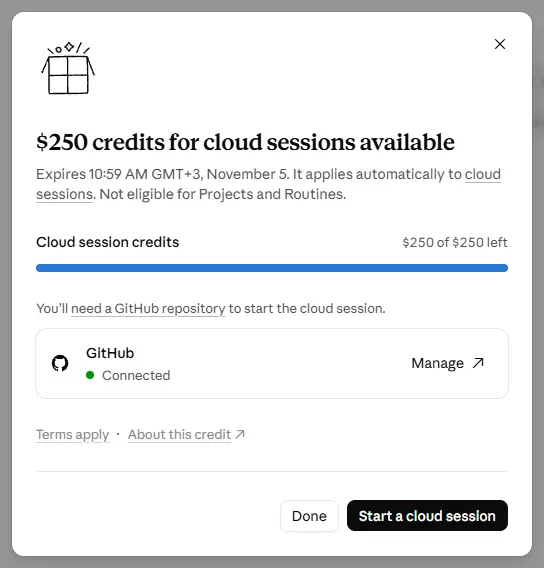
A window opens: "$250 credits for cloud sessions available." The "Cloud session credits" bar shows what's left — "$250 of $250 left."
Below it is the GitHub block. If GitHub isn't connected yet, connect it here and authorize the Claude app to access your repositories. Once that's done, the block shows a green dot and "Connected."
Click "Start a cloud session" — the credit starts getting spent from your very first cloud session. If you don't have a task ready, click "Done": the credit is already yours, and you can start a session later.
Step 3. Check the credit in settings: Settings → Usage
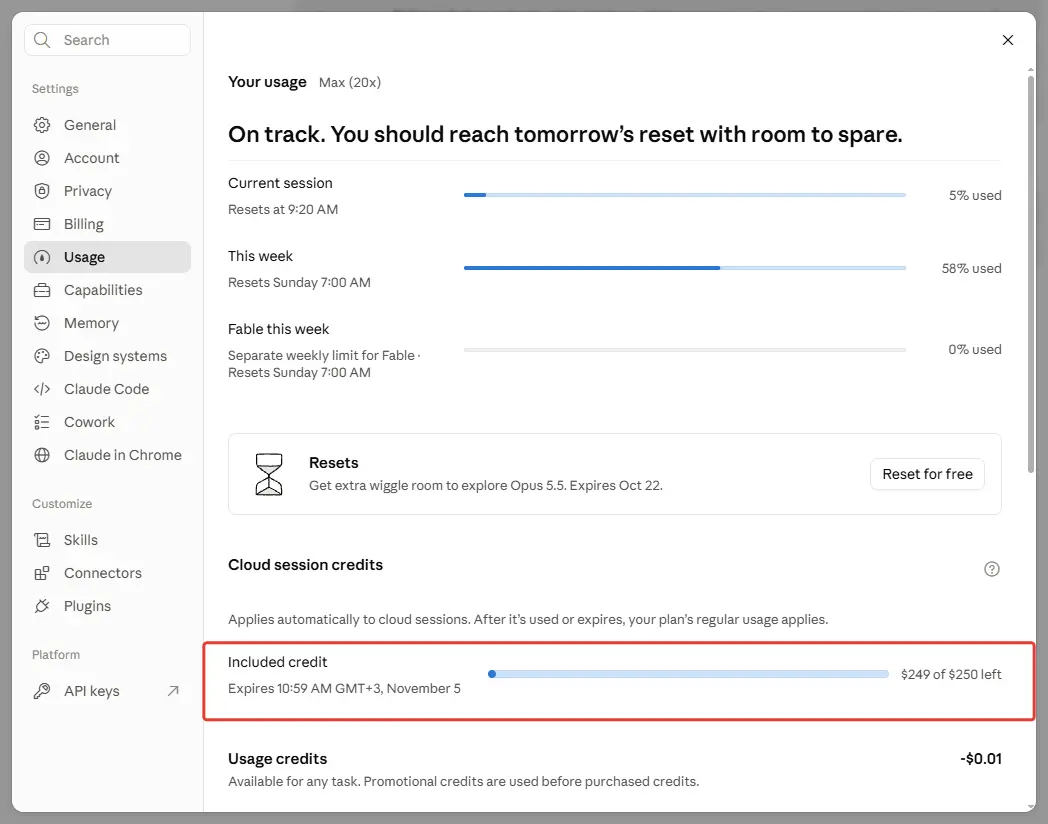
Open Claude's settings and pick Usage on the left. Scroll down to the "Cloud session credits" block — the "Included credit" line shows what's left ("$249 of $250 left") and the exact expiration time in your own time zone: "Expires 10:59 AM GMT+3, November 5."
If that line is there, the credit has been applied. Below it, under "Usage credits," is the key detail about spending order: the promo credit gets used before any purchased credit.
Step 4. Track the balance right in the Claude Code window
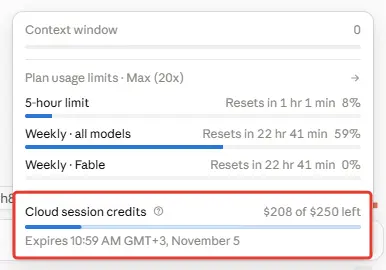
You don't need to open settings every time. At the bottom of the Claude Code window, next to the model name, there's a small circle. Click it to open the limits panel — at the very bottom is the "Cloud session credits" line with the remaining balance (in the screenshot, "$208 of $250 left") and the expiration date.
If you don't see the gift window
- Check your plan. The credit only applies to individual Pro and Max subscriptions that were active on September 23.
- Claim it through the terminal. In the Claude Code CLI, run
/claim-credit; connect GitHub with/web-setup. - Check Settings → Usage. No "Cloud session credits" block there means no credit was applied to your account.
What you need. A connected GitHub account and at least one repository: a cloud session clones it to run, and without a repository there's nothing to launch.
---
How to spend it
The credit is deducted automatically the moment you start a cloud session. There's nothing to activate.
Where you can launch a cloud session from:
From the browser — on the Claude Code page.
From the mobile app — the Code tab.
From the desktop app.
From the terminal — with the claude --cloud command.
And here's the whole point of it. The spending order is fixed: the credit is used first, and only once it runs out does your regular plan limit kick in. That means you can hit your weekly limit locally and keep working in the cloud until the credit runs out.
There was some confusion here, and Anthropic clarified it separately. After the announcement, many people concluded that cloud sessions had become a separate paid product. A few hours later, the company had to clarify: cloud sessions run on your existing Pro or Max plan, just like the rest of Claude Code, and the promotional credit is simply an optional one-time bonus that gets spent first.
There's no separate charge for the virtual machine itself. Once the credit is used up or has expired, cloud sessions are counted against your regular plan limits, like everything else.
---
Three limitations worth knowing in advance
Doesn't work with Projects and Routines. This is stated explicitly in the terms. If you keep your main work in projects, the credit won't get spent there.
GitHub is required. Not "recommended" — required: every session runs on its own branch in a copy of your repository.
Nobody explains what the dollars convert to. Anthropic doesn't publish how many hours of work or how many tokens a dollar of credit buys. The only things known for certain are the cap and the deadline. Figuring out "how far it will go" is only possible through trial and error.
---
Who will actually find this useful
Let's be direct, because the promotion isn't useful to everyone.
Useful if you write code with Claude Code and keep your projects on GitHub. In that case, $250 is a meaningful cushion on top of your regular monthly limit.
Especially useful for long-running tasks. Multi-file refactors, test runs, dependency updates — things that take time and don't require you to be present. Start it, close your laptop, come back to a finished branch.
And for parallel work. You can run several sessions at once, each on its own branch. But keep in mind that your quota gets consumed proportionally: five parallel tasks will burn through the credit roughly five times faster than one.
Not useful if you only use Claude in chat, don't work with GitHub, or keep everything in Projects. The credit will technically show up, but there won't be anything to spend it on — and it will expire on November 4.
---
What to do today
One action, five minutes.
Open Claude Code and check whether the offer appears. If it does, claim the credit: it's free and comes with no obligation.
Next, connect GitHub if it isn't connected, and confirm the credit shows up in Settings, under Usage.
Then put two dates on your calendar: October 7 — the claim deadline, and November 4 — the day the remaining balance expires.
And think ahead about what task you'll spend it on. Four weeks go by fast, and an expired credit stings more than one you never claimed.
---
What to read next
[12 Claude Code skills worth installing](/en/blog/claude-code-skills-worth-installing) — what to put your cloud session to work on so the credit doesn't go to waste.
[Why a project falls apart on the third edit](/en/blog/spec-coding) — what to spell out before launching a long task if you're going to close your laptop and walk away.
[What is vibe coding](/en/blog/what-is-vibecoding) — if you've heard about Claude Code but haven't tried it yet.
[Skills for Claude Code](/en/blog/claude-code-skills-guide) — the full guide to skills.
---