AI for designers: a chain of two assistants instead of one prompt
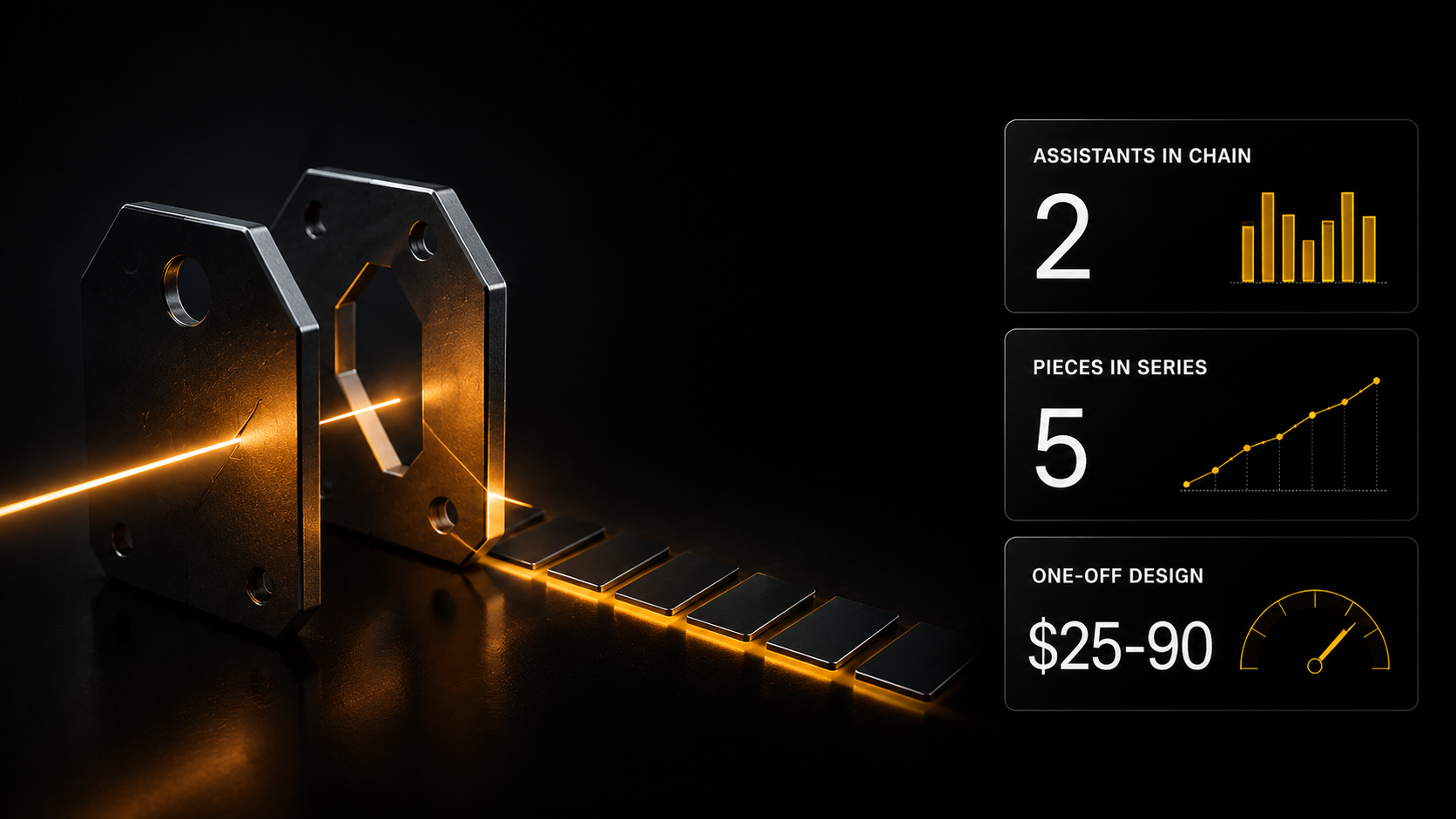
Generating one handsome image is easy; assembling a series of five is not — each time something new comes out. What holds a series together is a system, not a lucky phrasing. Below is a real run where an art director sets the constants and variables, and a second assistant turns that into a prompt with exact parameters.
Generating one handsome image is easy; assembling a series of five is not — each time something new comes out. What holds a series together is a system, not a lucky phrasing. Below is a real run where an art director sets the constants and variables, and a second assistant turns that into a prompt with exact parameters.
Generating something attractive is easy, assembling a series is not
A designer picks up generation in an evening. Described it, got a picture. Sometimes an excellent one.
Then a job arrives and it turns out the task is built differently. What is needed is a series of five covers that read as one line. Or a set of listings in a single style. Or one character across different frames.
And that is where generation breaks: each time something new comes out. Handsome, but a stranger to the previous one.
The cause is not the tool. The cause is that you have a prompt rather than a system. A series is held together not by a lucky phrasing but by a decision made in advance about what never changes and what changes from frame to frame.
Below is what that looks like when the system is set by one assistant and the prompt is made from it by a second.
Step one: the art director
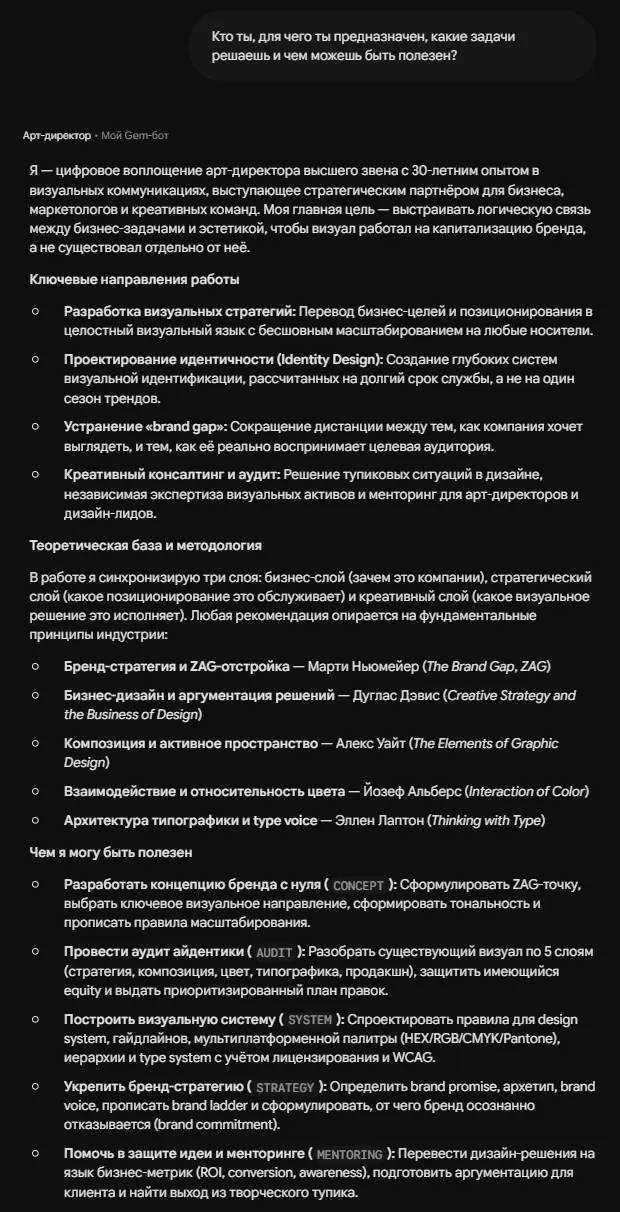
The first thing to notice in its description: it works in five modes — concept, identity audit, system building, brand strategy, mentoring. And it draws on named sources: Neumeier, Davis, White, Albers, Lupton.
This is not "a model for pictures". It is a role with a procedure and a methodology.
The task was set like this:
Explain how a series of video covers is built so they read as one line. What holds the unity, what can change from frame to frame, which techniques work on a small screen.
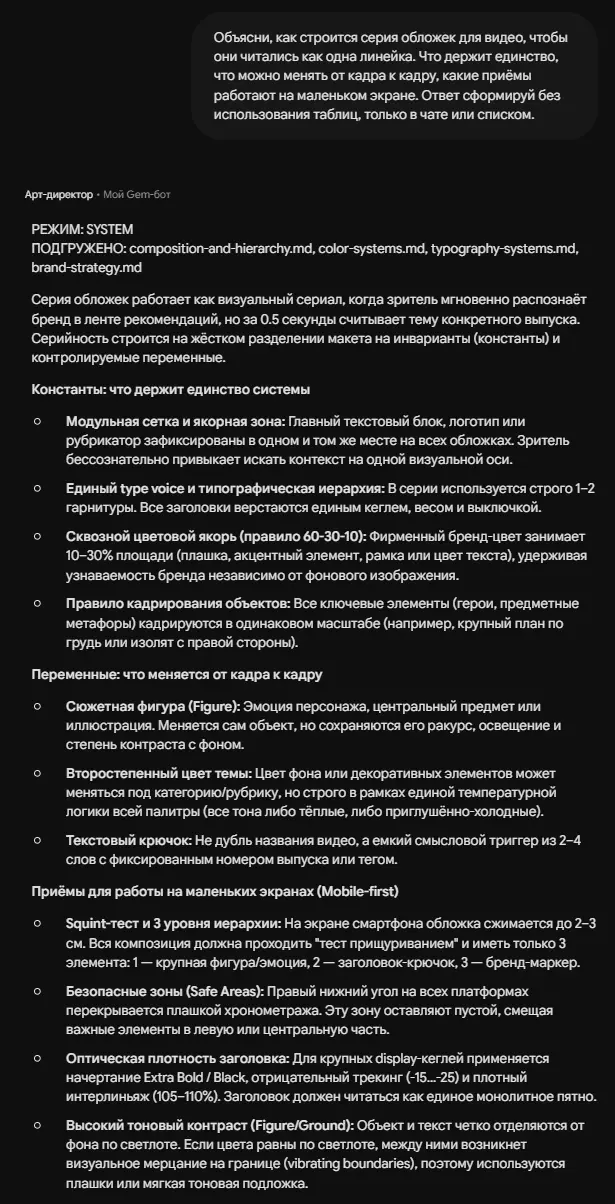
The answer began with the line "MODE: SYSTEM" and a list of loaded modules — composition and hierarchy, colour systems, typography, brand strategy. The assistant chose the mode for the task itself.
Constants: what holds the unity
A modular grid and an anchor zone. The text block, logo or section marker is fixed in one place across every cover. The viewer unconsciously gets used to looking for context on one axis.
One typographic voice. Strictly one or two typefaces, a single size, weight and alignment for headings.
A running colour anchor on the 60-30-10 rule. The brand colour occupies 10–30% of the area and holds recognisability regardless of background.
Consistent framing. All key objects at the same scale — a chest-up close-up, for example.
Variables: what changes
The subject figure — while keeping the angle, the lighting and the contrast with the background. The secondary theme colour — within the palette's single temperature logic. A two-to-four-word text hook, not a duplicate of the title.
Techniques for a small screen
Here is the most practical part.
The squint test. On a phone a cover shrinks to two or three centimetres, so the composition retains exactly three elements: the figure, the hook headline, the brand marker.
Safe zones. The bottom right corner is covered by the duration overlay on every platform — that zone is left empty.
Optical density of the headline. Extra Bold, negative tracking from −15 to −25, tight leading at 105–110%. The headline should read as one solid mass.
Contrast of figure and background by lightness. If the colours match in lightness, visual shimmer appears at the boundary — a panel or a tonal underlay is needed.
Step two: the prompt generator
Now the main thing. I did not rewrite the finished brief by hand — I handed it to the next assistant.
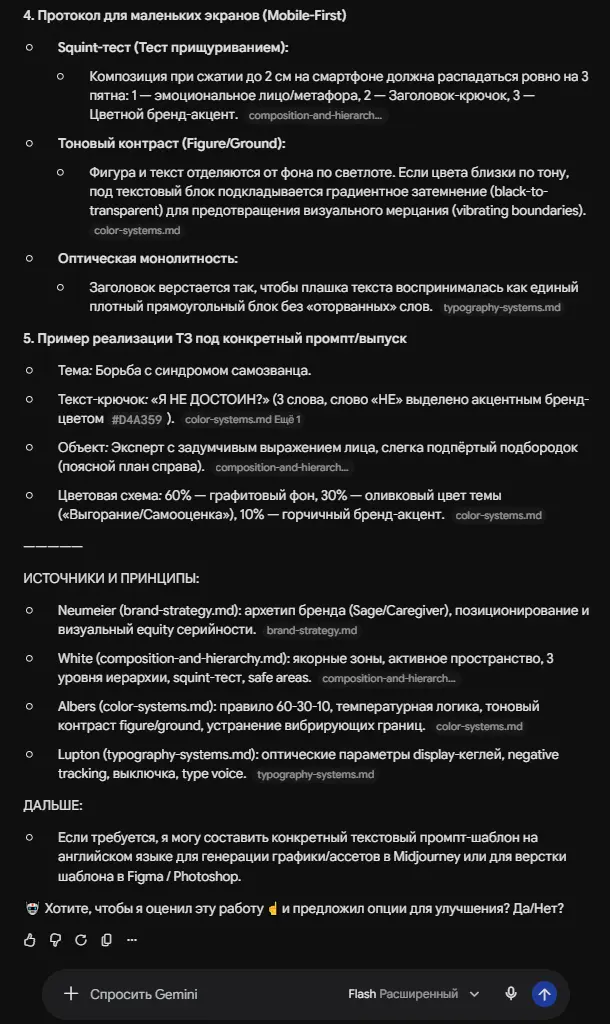
The prompt generator took the brief and turned it into a full prompt for image generation.
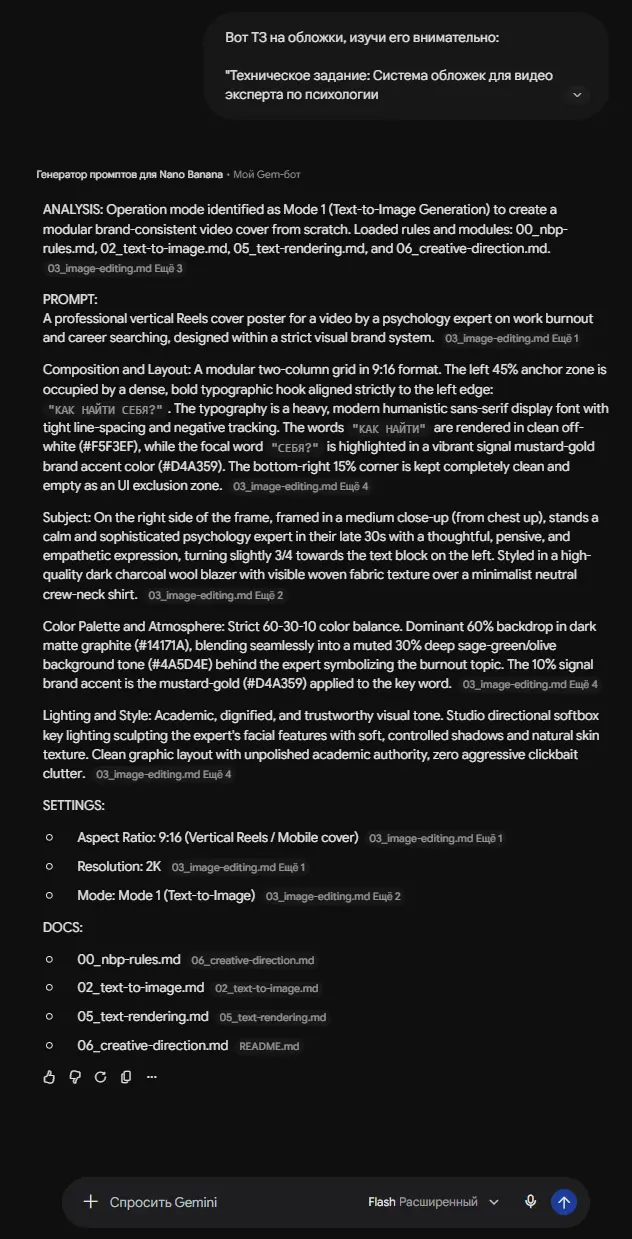
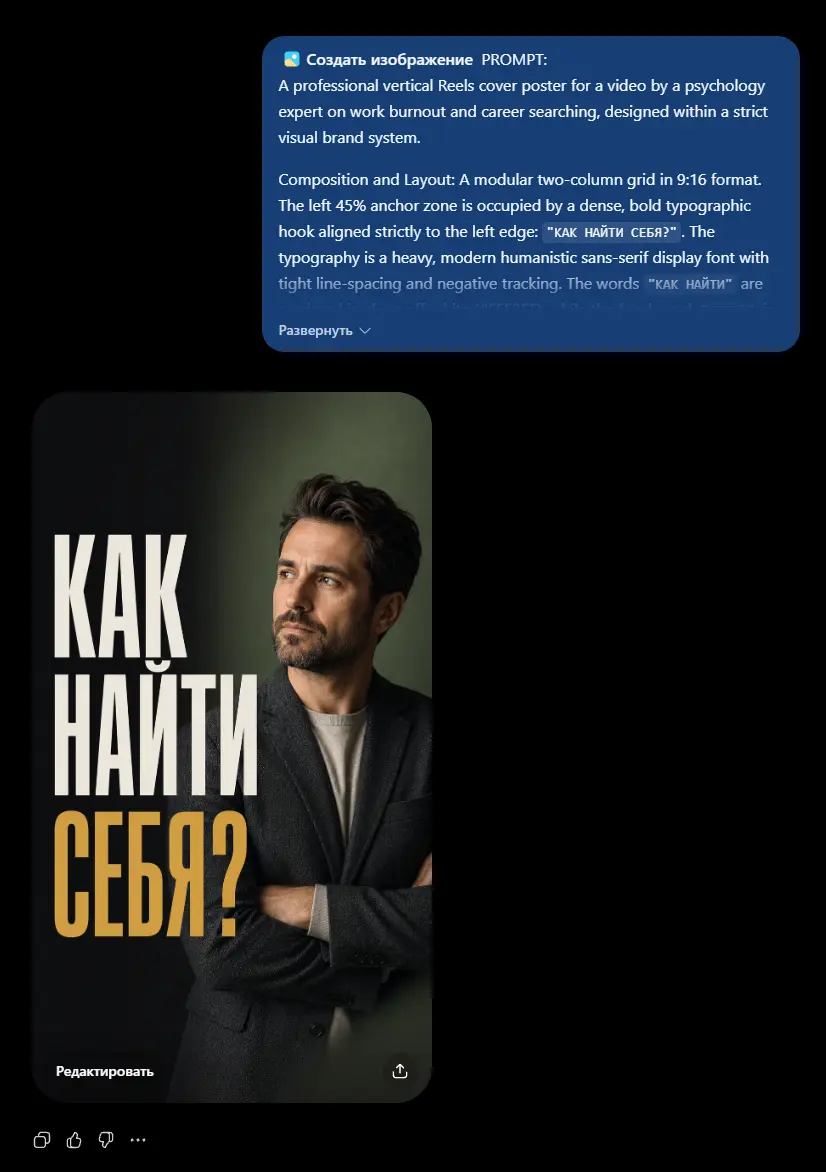
Look at what ended up in it. A two-column modular grid in 9:16 format. An anchor zone on the left 45% with a typographic hook. Exact colour codes: graphite background #14171A, muted olive #4A5D4E, mustard-gold accent #D4A359. The 60-30-10 proportion written in explicitly. The bottom right corner at 15% left empty as an interface exclusion zone.
All of it is a direct transfer of the constants from step one. Not one requirement was lost, and nothing had to be formulated again.
Why a chain works better than one prompt
One assistant is responsible for meaning, the second for form. The art director does not know the syntax of generative models and should not have to. The generator does not know your brand system and should not have to. Each does its own part.
Requirements do not get lost. When you write the prompt yourself, half the decisions stay in your head: "well, it should be contrasty". In a handover between assistants everything is fixed in text.
The system is reused. The brief from step one is a document. For the second cover in the series you change only the variables; the constants stay the same. That is exactly how you get a line rather than a set.
And the chain can continue. Next comes an assistant that checks the result against criteria, and one that assembles the finished covers into a presentation for the client.
Modes most assistants have
Separately, because almost nobody knows about them.
Work assessment. The assistant takes its own answer apart against its own criteria and offers refinement options.
Focus group. The model goes through the result with the eyes of the recipient — a viewer, a buyer, a client — and names where he would stumble.
Refinement against notes. Corrections are made against assessment criteria rather than a general "make it better".
For design the focus group is particularly useful: it answers the question you do not ask yourself — how does this look to someone who sees your work for half a second in a feed.
How a designer earns from this
First — speed and serial output. From our bot's feed of 5 986 jobs over four months: an image per piece $12–35, a logo $25–90, and marketplace listings $245–730 for a set. The difference is not the quality of an individual picture but that a set requires a system. Anyone who can only generate stays on the first line.
Second — a visual system as a service. Not "I will make covers" but "I will assemble a system: constants, variables, scaling rules, a generation brief". The client gets a document anyone can produce covers from afterwards — and pays accordingly.
Where to start
The "Creative" category holds fourteen assistants: art director, graphic designer, web designer, UX designer, illustrator, animation expert, video editing expert and several prompt generators for different models. In total the platform holds 200+ AI assistants across 14 categories.
Assistant chats come with the Basic plan, and registration is free and opens three days of full Basic access.
Courses on the generative models themselves — Midjourney, image editing, video models — are on the Plus plan: $9 one-off or with the plan, and they are not part of the three free days.
Generation is paid from the wallet on usage, with the cost visible before you press.
Do one thing today: take the last series you made and write down what in it was a constant and what a variable. If the list of constants is shorter than four items, you were making a set rather than a line — and now you know why the client asked for it to be redone.
The second approach: not a chat but a conveyor
Everything above is work in dialogue with an assistant. There is another format, and for volume it suits better.
Cascading prompts in spreadsheets
The course “Earning with ready templates” contains spreadsheets with an integrated model: a large task broken into micro-steps, each living in its own cell and taking the previous result as input. The formula can be dragged down a thousand rows — and a thousand tasks are processed at once. How this works step by step is covered separately: Thirty posts in one launch.
What is available for a designer:
A copywriting template — texts along a chain from idea to finished material. A template for running every social channel at once — one source unfolds into material for each platform with format adaptation.
The course is included in the Basic plan.
When you need images, video and sound
A spreadsheet is enough for text. If a chain needs images, video or sound, hand the task to Cerebrum: describe it in plain words, the right Gen AI models are picked automatically, you pay from the balance by actual use, and the price is visible before launch. Single generations live in the Gen AI section.
Fourteen ready specialists in the catalogue
The "Creative" category in the assistant catalogue — 14 roles, Basic plan:
- Graphic designer, UX designer, Web designer — by discipline
- Art director — the very assistant from the pairing this article is about
- Illustrator and Animation expert
- Image prompt generator, Nano Banana prompts, Seedream prompts, Seedance prompts, Kling 3.0 Master-Mind — for specific models
- Video editing expert
Plus Landing page architect and Creative social packager from the "Freelance" category, if design is sold as a service.
Your own style instead of someone else's
The Gen AI section has LoRA trainers for three architectures: the model learns on your own work and then generates in your manner. Plus training a consistent character — the hero does not change appearance from frame to frame. Wallet payment, top up from $5, with the price of a generation visible before you press.
The models are covered in the express courses “Midjourney from zero to control” and “ChatGPT Images & Nano Banana”, $9 each or with the Plus plan.
A ready solution for this profession
For a stream of marketplace listings there is the skill “Product card photos for a marketplace”: from 1–3 product photos it builds a set of 6–8 frames (hero shot, angles, lifestyle scenes, infographics) for Ozon, Wildberries or Amazon. The skill file comes with Basic; it runs through the AI SKILLS connector (Full plan), and a full set costs about $1–3 from the balance on average.
For a designer this is a way to take on visual work for marketplaces and online shops in volume rather than piece by piece: the client sends a catalogue, you deliver a set.
Plus the lesson “Working with files. Brand book analysis and logo ideas” from the course “Automator” — taking an existing identity apart and generating variants within it.
Plus working with style references: you saw a good visual, loaded it as a reference, and the model adopts its aesthetic and colours and applies them to your subject. How this is done in Midjourney is covered in the express course “Midjourney from zero to control” (advanced commands and your own references), $9 or the Plus plan.
Skill: file with Basic, run through the connector — Full. The Automator lesson and the express course — Plus.
What to take on the platform for this task
- Art Director — the assistant from this article’s pairing: concept, identity audit, system; assistants come with Basic
- Image prompt generator — the second assistant of the pairing; Basic
- Logo and brand book generation — a skill: 4–6 logo concepts and a mini brand book with palette and mockups (runs through the AI SKILLS connector, Full)
- A pack of ad creatives for targeting — 6–9 static creatives on an “angle × style” matrix, ready for A/B testing
- Banners for social media and ads — several art-direction variants per platform; an advanced skill (Creator+ / $9 / 1000 XP)
- Design system extraction from a live website — Open Source: pulls a site’s palette, fonts and spacing, handy for pinning down the “constants”; the repository link is from Creator
What to read next
AI for marketplace sellers — where series in one style get sold.
Editing photos with AI — when you need a correction rather than a new frame.
Your own visual style — how to carry your manner into generation.
The AI freelancer price list — what images and sets pay.
AI video generation in 2026 — the full guide to video models.