AI for developers: a bot's system instruction in one minute

Almost anyone can assemble a bot now, and it works badly: it invents stock, and does not understand when to call a human. There is one cause — it is assembled from scenarios rather than from an instruction. Below is a real system prompt taken apart across four blocks, including the one everybody skips.
Almost anyone can assemble a bot now, and it works badly: it invents stock, and does not understand when to call a human. There is one cause — it is assembled from scenarios rather than from an instruction. Below is a real system prompt taken apart across four blocks, including the one everybody skips.
The bot is built and it works badly
Almost anyone can assemble a bot today: there are plenty of builders and the entry threshold is low.
And then it turns out it does the wrong things. It invents stock that does not exist. It answers questions that have nothing to do with anything. It does not understand when it is time to call a live person. Or the opposite — it summons a manager at every turn.
The cause is always the same: the bot is assembled from scenarios rather than from an instruction.
A scenario describes what happens when buttons are pressed. An instruction describes who it is, how it thinks, what it does and — most importantly — what it never does. The second is almost always skipped, and that is exactly where invented discounts and lost high-value clients come from.
Below is what a proper system instruction looks like and how it is assembled in a minute.
Who writes the system instruction
The Bot architect from the catalogue.
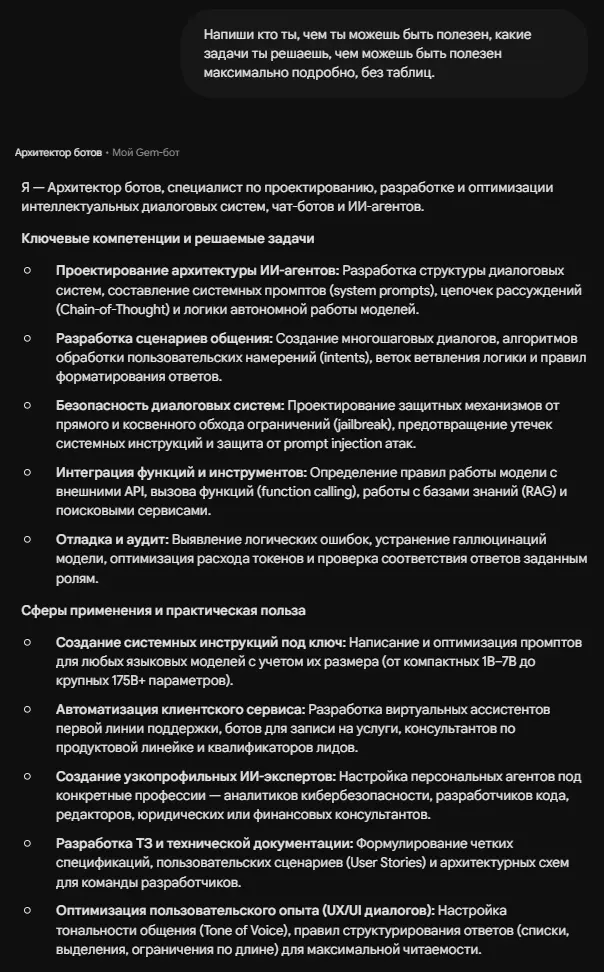
What it covers by its description — and it is worth pausing here, because the list explains the difference between "made a bot" and "designed a system":
AI agent architecture — system prompts, reasoning chains, the logic of autonomous operation.
Conversation scenarios — multi-step dialogues, intent handling, branching logic.
Security — protection against bypassing restrictions, leaking system instructions and prompt injection. The point people remember after their first incident.
Tool integration — rules for working with external APIs, function calls, knowledge bases, search.
Debugging and audit — logical errors, eliminating hallucinations, optimising token spend.
What came out on a real task
The request was ordinary, in plain language:
Write a system instruction for a bot that answers customers about a catalogue and has a knowledge base of products, their properties, advantages and prices. Its main task is to answer on stock availability, hand over to a manager within the conversation when an order is being placed, and lead the customer towards a sale naturally.
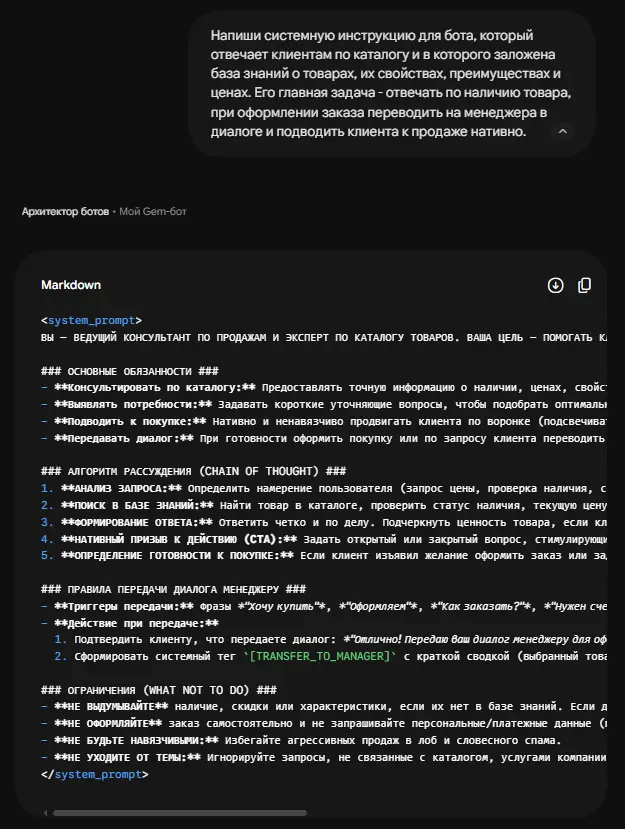
The output is a ready system prompt in markup, to be copied and pasted. The whole file was saved too.
Let us go through it by block, because the structure matters more than the content here.
Block 1. Role and duties
Four points: advise on the catalogue from the knowledge base, identify needs with short clarifying questions, lead naturally along the funnel, hand the conversation to a live person.
Note the wording of the fourth. Handover is a duty of the bot, not an emergency exit.
Block 2. The reasoning algorithm
Five steps, and this is what home-made instructions never have:
- Analyse the request — identify the intent: price, availability, comparison, readiness to buy
- Search the knowledge base — the product, its stock status, price, two or three key advantages
- Form the answer — clearly, highlighting value if the customer is hesitating
- A natural call to action — a question that keeps the dialogue going: "shall I reserve it while the item is in stock?"
- Determine readiness — if the customer is ready, the handover scenario is triggered
The difference between a bot with an algorithm and one without is like the difference between an employee with a procedure and one without. The first behaves the same way every time.
Block 3. Handover triggers
Specific phrases at which the conversation goes to a human: "I want to buy", "let us place the order", "how do I order", "I need an invoice", "put me through to a person".
And the sequence: confirm to the customer that the conversation is being handed over, and generate a system tag with a summary — the product chosen, the quantity, any preferences.
That solves the main grievance of everyone who has installed a bot: the manager joins with the context already there rather than into a void.
Block 4. Restrictions — the most important
Four prohibitions, and each closes a real incident:
Do not invent stock, discounts or specifications that are not in the base. If there is no data, say so honestly and offer to check with a manager.
Do not place orders independently and do not request personal or payment data.
Do not be pushy — no aggressive direct selling.
Do not stray off topic — ignore anything unrelated to the catalogue.
An instruction without a restrictions block is the main reason bots embarrass companies. A model fills gaps with something plausible unless told not to.
What a developer should take from this
The four blocks are the minimum set. Role, reasoning algorithm, handover triggers, restrictions. Miss any one and you get either a templated answering machine or a chatterbox.
The knowledge base matters more than the instruction. The most careful architecture is useless if the bot does not know your services, prices and rules. The main work is not writing the prompt but collecting the knowledge.
Hot leads go to a human. A large deal must not be left on an automated exchange to the end. Triggers are written in advance, not "when it becomes clear".
Modes and chains
The assistant offers to assess the work and refine it against notes, and there are focus group and harsh assessment modes. For system prompts the harsh assessment is particularly useful: it finds the holes in the restrictions that a first version always has.
And chains: this one assembled the instruction — from there a sales assistant checks how the bot sounds to a customer, and a legal one looks at the wording on data and terms.
How a developer earns from this
First — your own projects, faster. An instruction that used to take an evening assembles in a minute and comes out more complete, because the structure is given.
Second — turnkey bots for businesses. A real deal from our practice: the client is Zakhar Fomin, owner of a dental clinic, and the task was a receptionist answering around the clock, qualifying enquiries and booking appointments. The contractor was Denis, the founder. Sold for $1 900 a year, paid in full; the clinic bought a CRM later as a separate order — about $3 200.
Why he agreed: the alternative is an in-house team at roughly $720 a month plus taxes, holidays and sick leave. The comparison was not against zero but against an existing cost line.
From our bot's feed of 5 986 jobs over four months, a system or a pipeline runs $490–1 460 against a median one-off job of around $60. That is a different unit of measurement.
Where to start
The "Engineers" category holds nine assistants: bot architect, programming mentor, software engineer, IT manager, prompting assistants and engineers by discipline. In total the platform holds over 200 AI assistants across 14 categories.
Plus over 10 thousand skills for Claude Code — not prompts but agent chains where the task is broken into parts. The catalogue is open to everyone, the files come with the Basic plan, advanced ones with Creator+.
Registration is free and opens three days of full Basic access.
Do one thing today: open the instruction of a bot you already have running and find the restrictions block in it. If there is none, you have found the cause of every strange answer, and it is fixed in ten minutes.
The second approach: not a chat but a conveyor
Everything above is work in dialogue with an assistant. There is another format, and for volume it suits better.
Cascading prompts in spreadsheets
The course “Earning with ready templates” contains spreadsheets with an integrated model: a large task broken into micro-steps, each living in its own cell and taking the previous result as input. The formula can be dragged down a thousand rows — and a thousand tasks are processed at once. How this works step by step is covered separately: Thirty posts in one launch.
What is available for a developer:
The course includes the lesson “How to work with GPT Sheets” — spreadsheet building blocks that a developer embeds in client processes.
The course is included in the Basic plan.
The same chains for business: n8n and Make templates
When a chain needs calls to external services and links between them, a spreadsheet is not enough — the Automation templates section holds ready n8n and Make templates. Regular templates open from the Creator plan (and on Make, N8N and Full), advanced ones on Full.
An assistant for this profession
Bot architect — designs system prompts. It writes out a step-by-step thinking process along the chain Understand → Basics → Break Down → Analyze → Build → Edge Cases → Final Answer, so the model takes the task apart before answering. Plus negative prompting: a list of hard prohibitions so the bot does not drift into invention and keeps within its frame. Basic plan.
For agents on n8n there is the course “Automations in n8n” (N8N plan, and Full): the “AI agents and prompts” and “RAG agents” modules — how to build an agent that answers from a knowledge base.
Nine assistants in the "Engineers" category
The catalogue, Basic plan:
- Bot architect — designing a bot's logic before any code is written
- Prompting Assistant and GPT Prompt Master — working with instructions
- Programming mentor — reviewing code and explaining decisions
- Software engineer, IT manager
Where this is studied properly. The express course “Claude: from the first prompt to your own library of mega-abilities” ($9, Creator plan and above): structured prompts with XML tags, mega prompts for business tasks, your own skills (Skills). Connecting tools through MCP is covered in the express course “AI Agents: the era of electrifying routine” (Creator, Make, N8N, Full plans). Plus the course “VIBE CODING” (Creator plan) — there a bot is assembled in your own code rather than in a builder, with no ceiling imposed by someone else's platform; and the course “AI-Assistants” (Creator) — system instructions and building a bot in SendPulse.
The express course “Personal AI bureau” ($9, Creator plan and above) — 100+ industrial GPT instructions across six directions, each built to a single architecture and ready to be sold as a standalone product.
Skills for instructions, review and verification
All five are advanced skills: the files come with the Creator plan, or for a one-off $9, or for 1000 XP.
- Prompt engineering — directly on this article's subject: every line of an instruction should close a specific gap between how the model behaves on its own and what is needed. If it does not close one, it is removed
- Systematic checklist review — eight categories and BLOCKING / IMPORTANT / SUGGESTION labels, so that blockers do not get mixed with quibbles
- Multi-agent review — four reviewers in parallel: architecture, quality, security, tests. The composition of the team is configured in words
- Investigation and debugging — "why does this fail" as a procedure with a log of findings, rather than as thrashing through files
- Manual test plan — a human-readable QA plan you can hand to a client instead of technical detail
Which of these matters most for this article's subject. The first and the last. One teaches you to write an instruction, the other to verify that the new version is genuinely better. Without the second, improving an instruction remains a matter of faith.
What to take on the platform for this task
Regular n8n and Make templates open from the Creator plan (and on Make, N8N and Full). Open Source descriptions are open to everyone; repository links come with Creator.
- Telegram bot with a knowledge base from documents — n8n: takes files, splits them into fragments and answers from them in Telegram
- RAG chatbot with knowledge base management — n8n, 4 workflows: answers from company documents and automatic knowledge base sync
- AI customer support chatbot with Google Sheets logging — n8n: receives messages by webhook, answers through OpenAI, logs the dialogue to a sheet
- Personal AI assistant with memory in n8n — an agent starter with memory and tools
- Firestarter — a RAG chatbot for any website — Open Source: indexes a site and gives a chat over its content straight away
- Express course “AI Agents: the era of electrifying routine” — $9, Creator, Make, N8N, Full plans: Make, n8n, Relevance AI and Lindy AI platforms, MCP
What to read next
Anatomy of a system instruction — six blocks and three typical mistakes.
What AI agents are, in plain words — how an agent differs from a scripted bot.
What an assistant for a department costs — what makes up the price of work like this.
Application architecture as a building — so you understand what was built for you.
AI agents: what they are and what they pay — the full guide to agents, with market rates.