Kling 4 Video Templates: 5 Effects With Your Face, Prompts and Previews
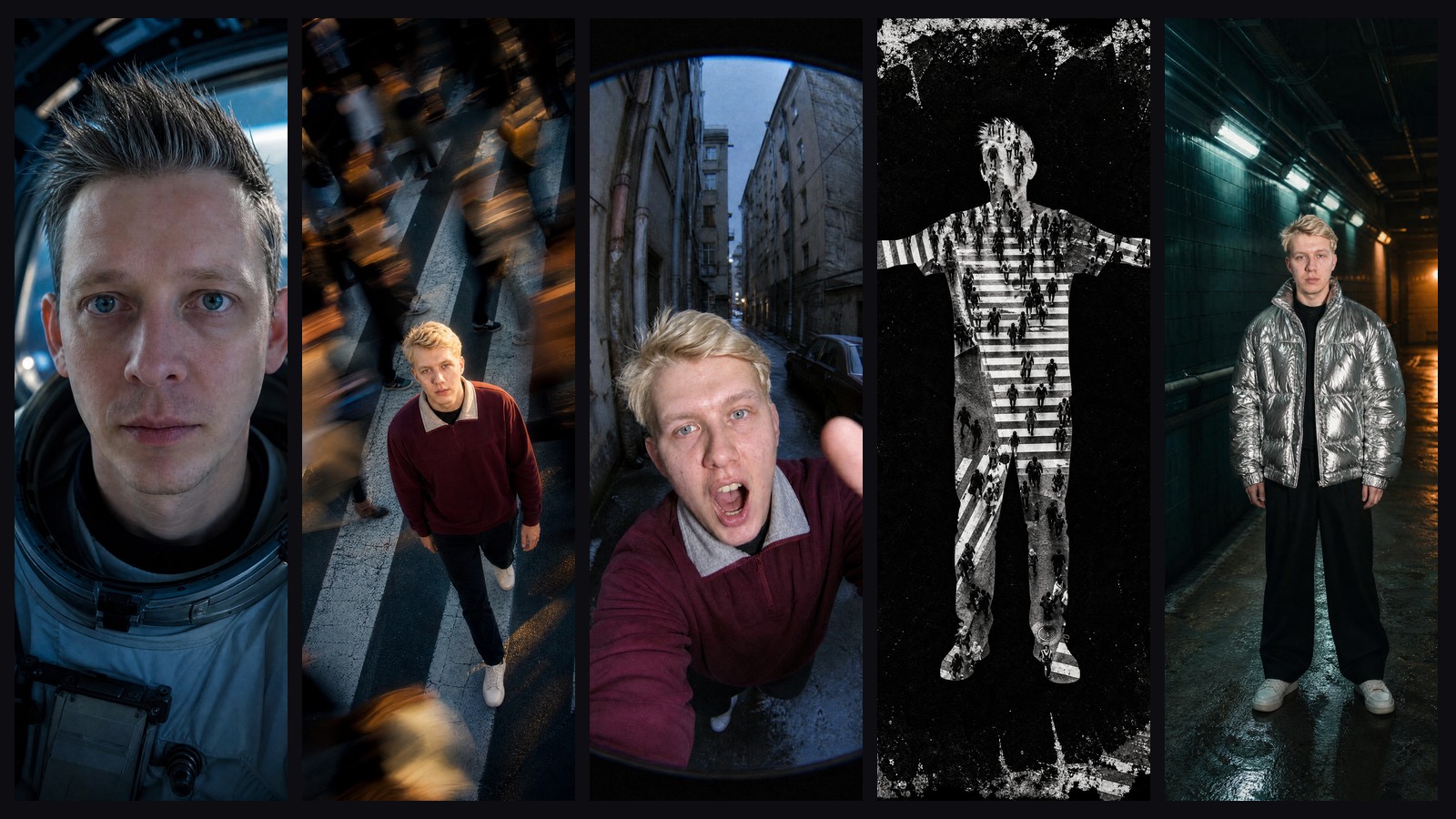
Five Kling 4 effects with your own face: Multiverse, Echo Print, Hyperloop, City Silhouette, Fluid Jump. Full prompts, previews and the exact cost of each clip.
A video template in a neural network is a ready-made effect clip where you put your own face. You upload a photo, the network builds a starting frame with you in it, and Kling 4 brings it to life using a prompt that has already been tuned. Below are five such effects from Magnific's recent guide to Kling 4, rebuilt for vertical Reels and published on the platform: Multiverse, Echo Print, Hyperloop, City Silhouette and Fluid Jump. For each one you get our starting frame, the finished clip, both prompts in full, the price and the launch button.
Short on time? Five points
- The effect depends on the prompt, not the model. Kling 4 can do almost everything in the guide, but on the first try it gives you "similar", not "exact". What makes the difference is timing by the second and a list of what must not change.
- The face is preserved through a character card. First your photo is turned into a sheet with the face from the front, in profile and full length. All later frames are built from it, so the person in the clip stays themselves.
- The starting frame decides half the result. Kling animates what it is given. If the frame has no room for motion, the effect will not happen, however you describe it.
- A clip costs $1.38–2.14. That is the cost of all three steps, paid from your balance, with no separate subscription for each service.
- Check every frame, not just the clip as a whole. Half of the defects are invisible at normal speed: a frozen ending, a face that "drifts", an extra double for half a second.
All five templates are already on the platform: open the video templates.
Where the effects come from and why the prompts are ours
A guide called "Video Trends with Kling 4": eight surreal effects — a melting world, a multiverse, a hyperloop, a silhouette with photos inside, a crowd echo, a liquid jump, a spiral of houses and a compression of reality. Each comes with carousel frames and the original prompt.
The original prompts are written for an image the authors already have and for a 4:5 format. We needed something different: for anyone to upload a single photo of themselves and get a vertical 9:16 clip in which they play the lead. So we kept the idea of each effect, wrote the prompts from scratch and ran them dozens of times. We compared every result with the clips from the guide frame by frame: not every 4th or 8th frame, every frame. In the first version, three of the eight effects did not resemble the guide's clips at all, and we had to redo them based on that comparison.
Five effects made it into templates. Two of them (Spiral Collapse and Reality Compression) work with a city rather than a person, and did not fit into templates with your face. The eighth (World Melt) is not in this selection yet.
How a template works: three steps
A template is three generations in a row, each with its own price. The prompts for them are hidden inside the template; the user only sees buttons. Here we reveal them.
Step 1. Character card — GPT Image 2, $0.12. From one to three of your photos you get a horizontal sheet: face from the front, three-quarter view, profile, and full length from the front and back. This is the character's "passport": the next step uses it to draw the person in any setting without losing the face.
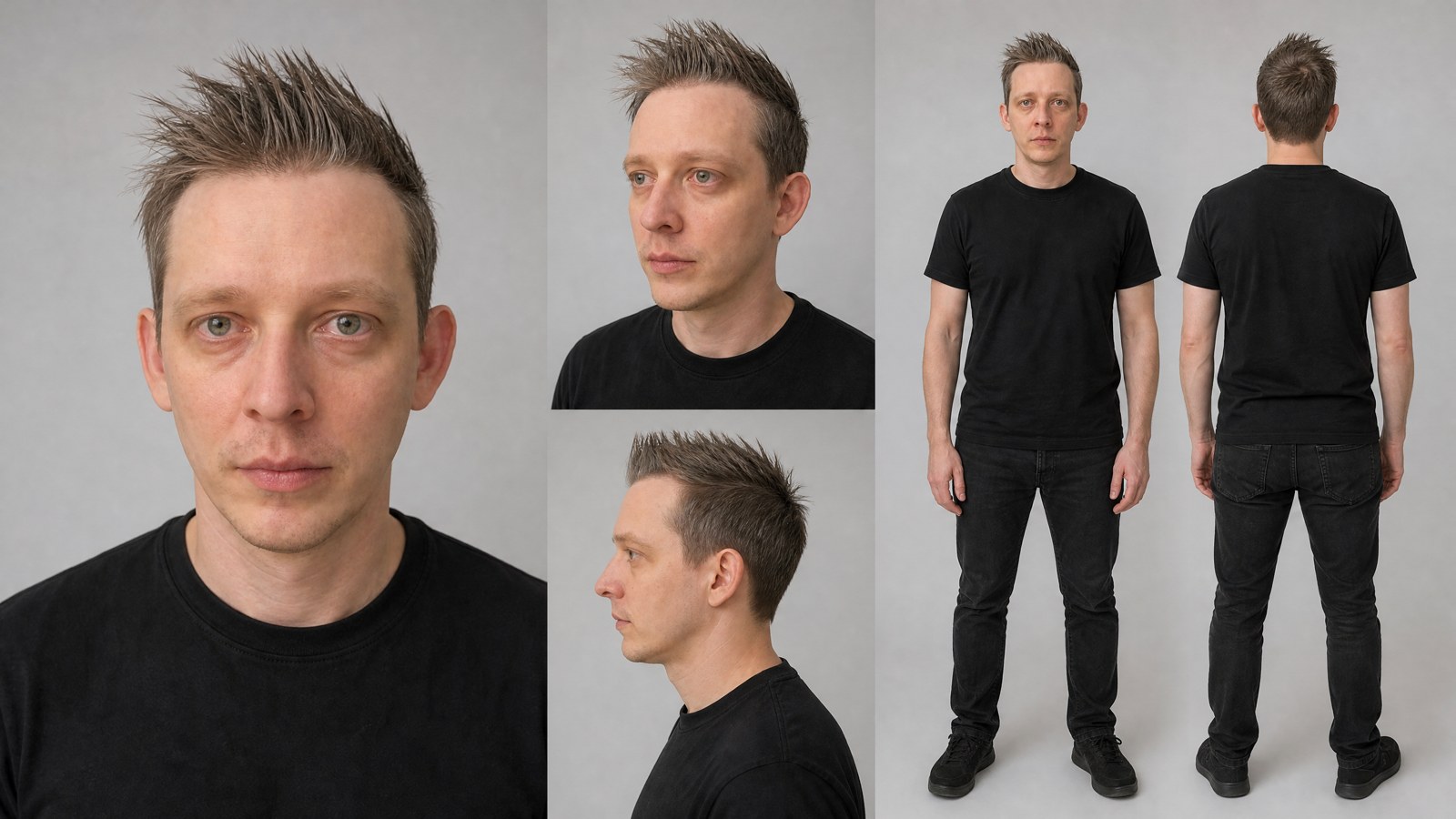
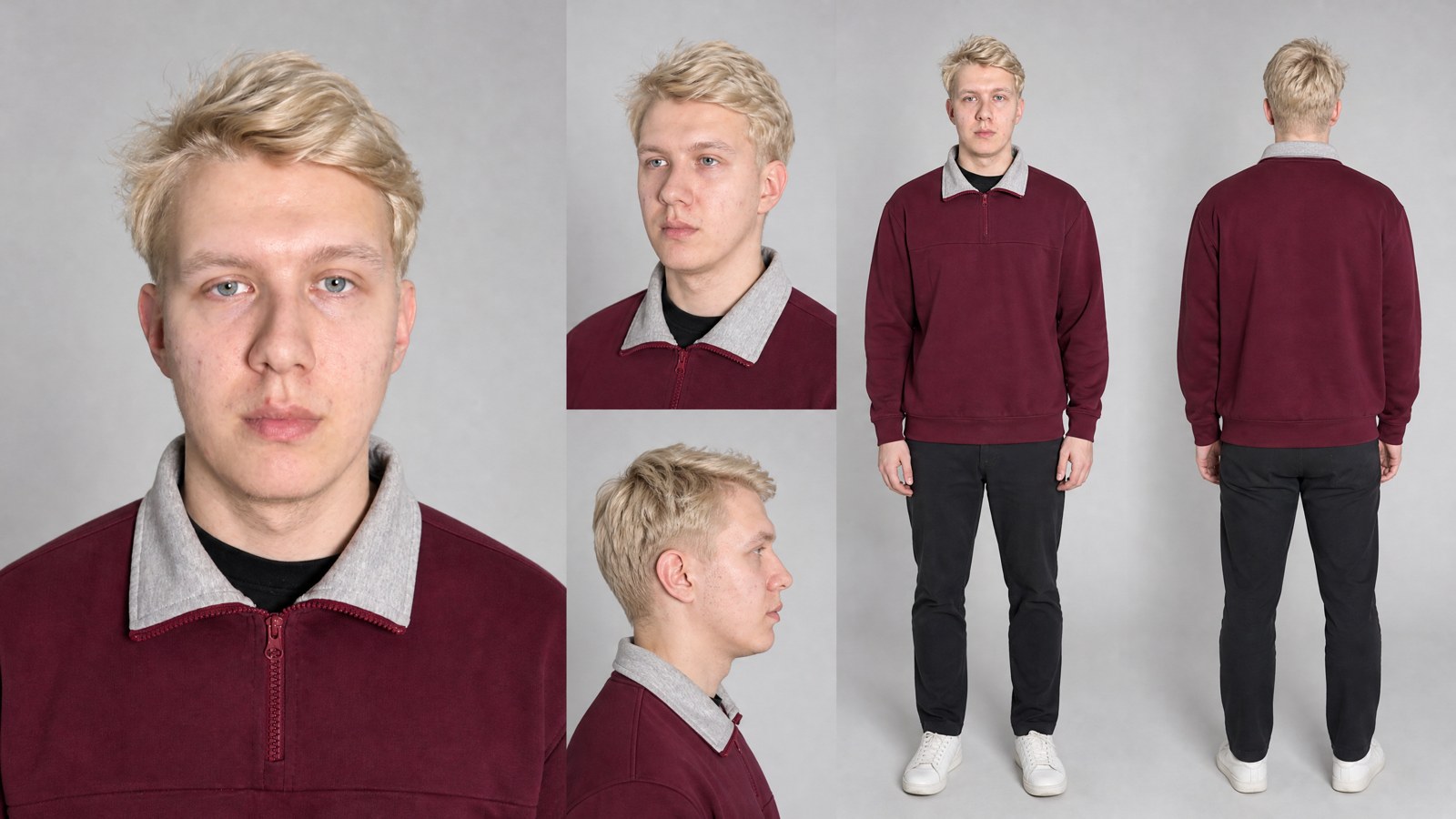
One card prompt serves all the templates:
```
Professional character reference sheet of the EXACT same person from the photo(s), for consistent use in AI video. Clean neutral light-grey studio background, soft even daylight lighting, photorealistic, sharp focus. Layout on one horizontal sheet: left — large front-facing head-and-shoulders portrait looking straight into the camera; center — three-quarter view portrait and strict side profile; right — full-body standing view front-on and full-body back view. Preserve the identity exactly: same face shape, eyes, nose, lips, skin texture, age, facial hair and the same hairstyle and hair colour. Wardrobe: the same clothes as in the photo; if only the upper body is visible, continue the outfit naturally with matching trousers and shoes. Natural neutral expression. No text, no labels, no logos, no watermarks.
```
Step 2. Starting frame — GPT Image 2 from the card and your photos, $0.12. Here the person is placed into the effect's scene: a spacesuit, a crossing, a tunnel. If you want a different place, you can add it in your own words (up to 300 characters): the composition of the effect stays, the place and the light change.
Step 3. Video — Kling 4.0 Keyframes from the starting frame, $0.19 per second. In the video prompt the starting frame is marked as @first_frame: this is how Kling knows which picture to build the motion from.
The effect prompt formula
Magnific's guide has a good idea: an effect is easier to control when you separate what changes from what stays put. Their structure reads: "Take the reference. Change [one element] through [a visible sequence of motion]. Keep [face, materials, scale]. One camera rule. End on [a readable final state]. Avoid [the most likely mistake]."
From our runs, three things are worth adding:
- Timing by the second. The phrase "fast cuts" gives three cuts per clip. "A hard cut every 0.5 seconds, 16 realities in 8 seconds" gives sixteen.
- The main thing goes first, marked CRITICAL. That way the rhythm and motion do not get lost among descriptions of light, film stock and clothing.
- A long NEGATIVE list. Put in everything that broke in earlier runs: "frozen face", "smooth stabilizer", "chrome face", "hero double".
1. Multiverse: you in sixteen worlds in 8 seconds
What happens. The face stays in place, and every half second a new reality appears around it: astronaut, diver, king, pirate, samurai, cowboy, knight, chef, boxer, rock star, detective, Viking, firefighter, mad scientist, a gentleman at a ball — and then the astronaut again, so the clip loops.
What we fixed compared with the first version. The first clips looked like computer graphics: plastic skin, game-style costumes. Three blocks of the prompt helped: "a real film studio and real fabrics", a light handheld camera shake, and 35 mm film with grain. On top of that, the person is "alive": blinks and turns their head slightly.
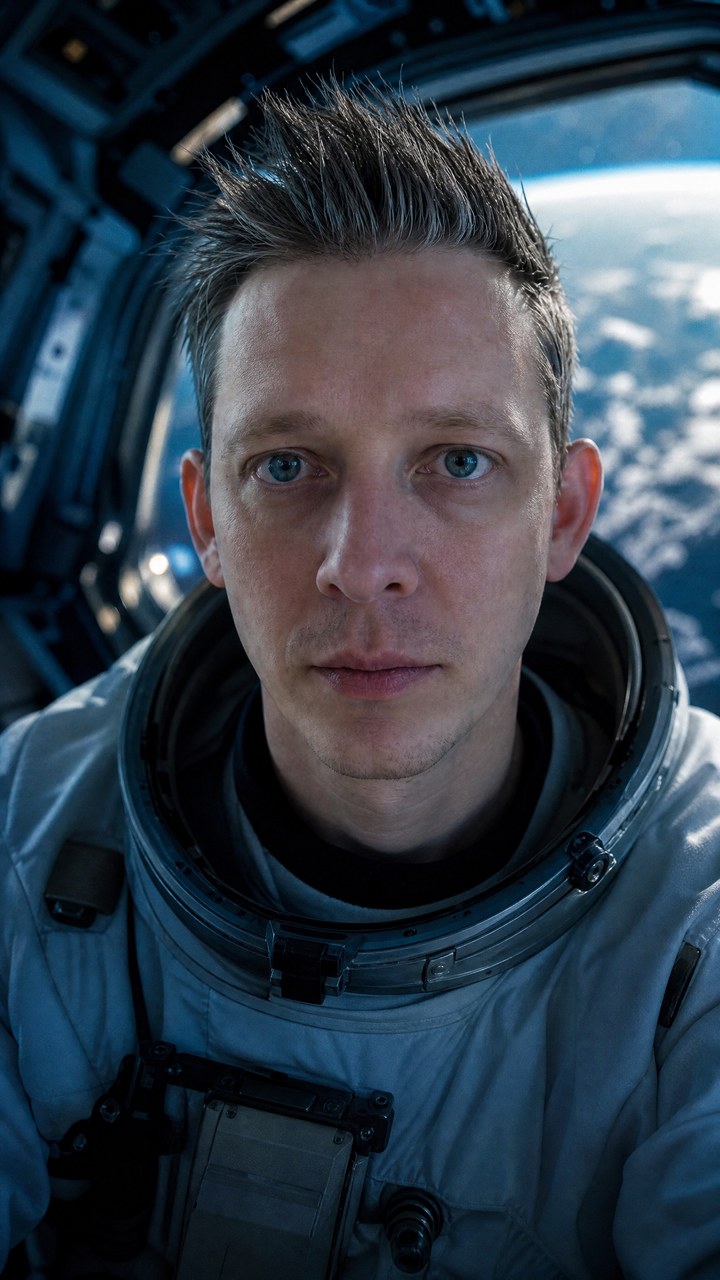
Starting frame prompt:
```
Use the character sheet and photo(s): the EXACT same person, identical face, eyes, nose, lips, skin, age and hairstyle. Create one ultra-photorealistic vertical cinematic film still, 35mm Kodak Vision3 look. PERFECTLY LOCKED FRONTAL CLOSE-UP: the head is exactly in the horizontal center of the frame, eyes on the upper third line, looking DIRECTLY INTO THE CAMERA, neutral calm expression, shoulders visible at the bottom. Reality: a realistic NASA-style astronaut suit with the helmet visor open, inside a spacecraft, dramatic cold blue instrument lighting on the face, Earth visible through a window behind. Natural skin texture, film grain, soft halation, shallow depth of field. No text, no logos, no watermarks.
```
Video prompt:
```
Ultra-fast multiverse supercut built from @first_frame: the EXACT same person, identical face, eyes, nose, lips, skin, age, facial hair and hairstyle in every shot. FRONTAL CLOSE-UP in every shot: head in the center, eyes on the upper third, looking INTO THE CAMERA with the same calm serious expression, shoulders at the bottom of the frame.
REALISM — CRITICAL: every shot must look like REAL footage shot on a cinema camera on a real film set, NOT CGI, NOT a 3D render, NOT an AI illustration. Real costumes made of real fabric, leather and metal with wear and imperfections, real practical light sources, real locations, true-to-life scale and perspective. Natural skin with pores, fine wrinkles, slight shine and imperfections; real hair strands.
LIFE IN THE SHOT: subtle HANDHELD camera micro-shake in every shot (gentle organic drift, never jerky); the person is alive — small natural head movements, a slight tilt or turn of a few degrees, natural blinking, breathing, eyes reacting.
FILM LOOK: shot on 35mm motion-picture film — visible organic film grain, soft halation around highlights, gentle gate weave, slight lens softness at the edges, natural film colour response, no over-sharpening, no plastic smoothing.
RHYTHM — CRITICAL: HARD CUTS every 0.5 seconds, 16 different realities in 8 seconds, no transitions, no morphing, no dissolves. Each reality is a recognizable character role with its own costume, set and colour grade:
1 astronaut in a spacesuit with open visor inside a spacecraft, cold blue light; 2 deep-sea diver in a brass helmet underwater, teal light, bubbles; 3 king in a golden crown and red velvet robe in a throne hall, candlelight; 4 pirate captain in a tricorn hat on a ship deck in rain; 5 samurai in lacquered armour and a kabuto helmet in a misty bamboo forest; 6 cowboy in a hat and leather duster on a dusty western street at sunset; 7 medieval knight in a steel helmet with raised visor, torchlight; 8 chef in a white toque in a steaming restaurant kitchen; 9 boxer in a ring with a sweaty face and gloves up, harsh top light; 10 rock star with sunglasses under red and purple stage lights and smoke; 11 film noir detective in a fedora in a rainy neon street; 12 Viking with a fur collar and braided beard in falling snow; 13 firefighter in a helmet with a soot-streaked face in front of a fire glow; 14 mad scientist with wild hair and goggles in a lab of glowing flasks; 15 gentleman in a tuxedo and bow tie at a gala with chandeliers; 16 back to the astronaut in the spacecraft — the loop closes.
NEGATIVE: no CGI look, no video-game look, no plastic or waxy skin, no airbrushing, no cartoonish costumes, no green-screen look, no change of identity, no face morphing, no static frozen face, no smooth gimbal motion, no zoom, no shots longer than 0.5 seconds, no transitions, no text, no logos, no watermarks, no trademarked characters.
```
Price: about $1.76 (card $0.12 + frame $0.12 + 8 seconds of video $1.52). Make Multiverse with your own face
2. Echo Print: you walk while the city rushes past
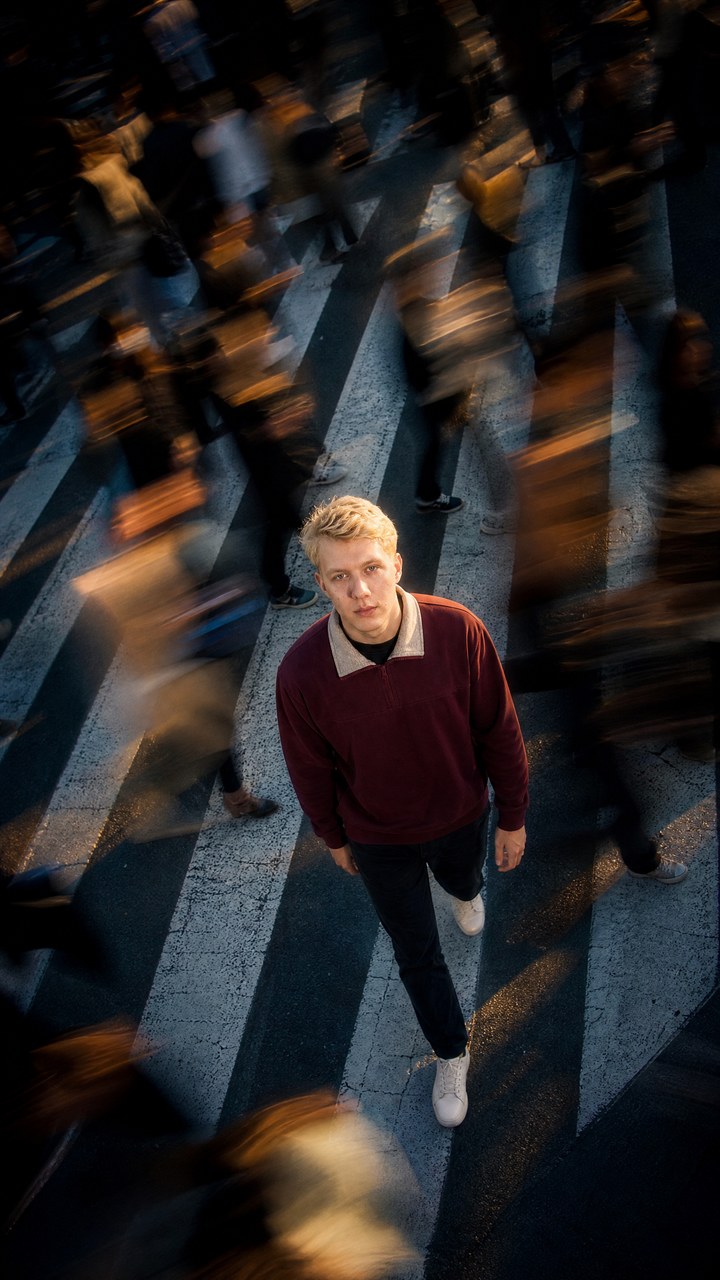
What happens. The camera starts high above a crossing, with the horizon tilted 15 degrees (a "Dutch angle"), and slowly descends to eye level. The hero walks straight at the camera in slow motion, while the crowd around rushes 4–6 times faster and leaves semi-transparent trails behind, like a long exposure.
What we fixed. The first version was shot at eye level and looked like ordinary street footage. The view from above and the Dutch angle added depth, and the crane move downward gave the feel of an expensive music video.
Starting frame prompt:
```
Use the character sheet and photo(s): the EXACT same person, identical face, eyes, nose, lips, skin, age, hairstyle and the same outfit from the sheet. Create one ultra-photorealistic vertical cinematic film still for a music video. HIGH-ANGLE shot from about the height of a second-floor window, camera looking DOWN at the person, with a strong DUTCH ANGLE: the whole frame tilted about 15 degrees. The person walks straight forward toward the camera in the middle of a packed metropolitan crosswalk, full body visible, white zebra stripes on dark asphalt, head raised looking up into the lens with a calm, confident, intense expression. Hundreds of pedestrians around are captured with LONG-EXPOSURE motion blur — smeared ghost-like streaks crossing in every direction — while the person stays razor sharp. Late-afternoon golden-hour light cutting between skyscrapers, warm highlights on the skin, cool blue-grey shadows on the street. Anamorphic 35mm film look, organic grain, soft halation, deep cinematic contrast. No text, no logos, no watermarks.
```
Video prompt:
```
Ultra-cinematic experimental music-video shot from @first_frame: preserve the exact person, face, hairstyle, outfit, street, light and visual style. ONE CONTINUOUS UNINTERRUPTED SHOT, no cuts.
CAMERA — CRITICAL: the shot starts HIGH ABOVE, looking steeply DOWN at the person with a strong DUTCH ANGLE (frame tilted about 15 degrees). Over the 8 seconds the camera performs a smooth, slow CRANE DOWN while gliding BACKWARD in front of the person, gradually coming down to eye level and slowly rolling the tilt back toward level, finally revealing the deep avenue of skyscrapers behind. Heavy, stable, expensive camera motion like a Technocrane, no shake, no zoom.
SUBJECT: the person walks straight FORWARD toward the camera the whole time in graceful cinematic SLOW MOTION (about 40% speed), confident, looking into the lens, hair and clothes moving gently. The person is always perfectly sharp, never duplicated, never blurred.
CROWD — ECHO PRINT: hundreds of pedestrians rush around and past at 400–600% speed, rendered as LONG-EXPOSURE ghost streaks — translucent overlapping silhouettes and smeared trails following their real directions, some crossing very close to the lens. Time is visibly different for the hero and for the city.
STYLE: high-end hip-hop / fashion music video, golden-hour light between skyscrapers, warm skin, cool shadows, anamorphic 35mm film grain, soft halation, deep contrast.
NEGATIVE: no blur or trails on the main character, no duplicated main character, no static crowd, no empty street, no cuts, no camera shake, no identity or clothing changes, no distorted faces, no text, no logos.
```
Price: about $1.76. Make Echo Print with your own face
3. Hyperloop: copies of you along the whole route
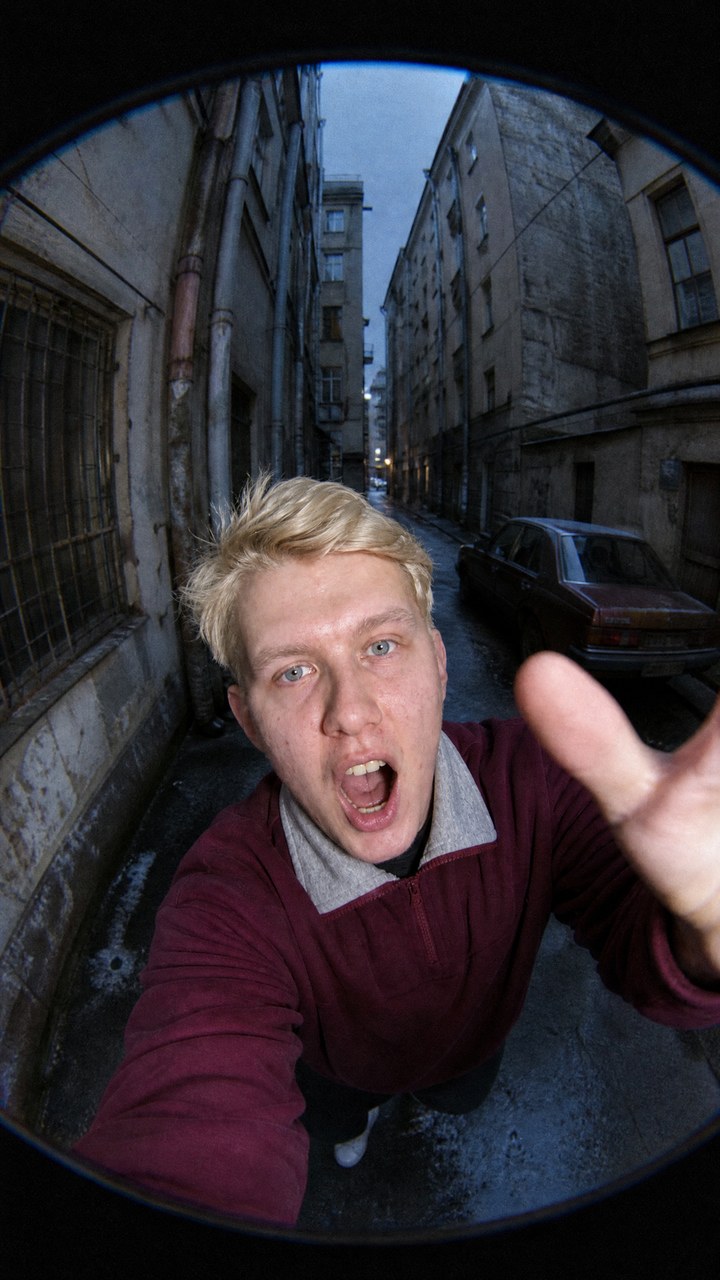
What happens. An ultra-wide fisheye lens, a flash in the face, the style of early-2000s street video. The camera darts through a courtyard and stops right up against the next copy of the hero: a handstand on a car roof, graffiti on a wall, a pose on a trash can, behind the wheel of an old car. In the finale the camera tilts onto its side, the copies fly past, and everything dives into a dark archway.
What we fixed. In the first version the camera drifted at one speed and the person was tiny somewhere far away. The clip from the guide has a different rhythm: a 0.4-second dash, then a stop point-blank, with the hero close up holding the pose for about a second. We wrote out the whole clip segment by segment, so the prompt below reads like an editing sheet.
Starting frame prompt:
```
Use the character sheet and photo(s): the EXACT same person, identical face, eyes, nose, lips, skin, age, hairstyle and the same outfit from the sheet. Create one raw vertical photograph in an underground Y2K street-photo style. Shot with an extreme 10mm FISHEYE lens very close to the person: they lunge toward the lens shouting with energy, mouth open, one hand reaching at the camera, upper body filling the bottom half of the frame with strong barrel distortion. Behind them a narrow, gritty old Eastern European alley recedes into deep perspective — tall worn plaster buildings, pipes, a rusty parked car, wet asphalt — with a clear direction of travel down the street. Harsh direct on-camera flash on the person, cold blue-grey ambient light in the street, heavy analog grain, slight chromatic aberration, early-2000s digital photo look. No text, no logos, no watermarks.
```
Video prompt:
```
Chaotic Y2K underground music video from @first_frame: ONE UNBROKEN STOP-MOTION FISHEYE HYPERLAPSE, no edit cuts. The exact same person from the frame — same face, hair and outfit — appears again and again along the route. Extreme 10mm fisheye, harsh direct flash on the person, cold blue-grey streets, heavy grain, chromatic aberration, frame-stepped jerky motion (no smooth interpolation).
RHYTHM — CRITICAL: the camera does NOT glide past at constant speed. It RUSHES forward in a 0.4-second burst, then STOPS dead very close to the next copy of the person, who fills most of the frame and holds a bizarre pose for about one second, then the camera rushes on. The person is always BIG and close at every stop.
0.0–0.6 s: the person screams straight into the lens, then lunges and leaps out of frame to the left.
0.6–1.0 s: the camera bursts forward down the narrow alley toward a rusty old car.
1.0–2.0 s: stop low in front of the car's windshield: the same person does a HANDSTAND on the car roof, legs straight up, held.
2.0–2.3 s: whip turn to the wall.
2.3–3.3 s: stop close: the same person crouches spray-painting a huge bright magenta graffiti on the wall, then walks out of frame.
3.3–3.6 s: burst forward into a corner yard.
3.6–4.5 s: stop: the same person squats on top of an overflowing dumpster, hands together, staring into the lens.
4.5–4.9 s: swing to an old white car and push through its open window.
4.9–5.8 s: inside the car the same person sits behind the wheel, leans into the lens grinning and lurches at the camera.
5.8–8.5 s: the camera bursts into a very tall, narrow courtyard alley and ROLLS 90 degrees onto its side while racing forward; copy after copy of the same person flies horizontally past the lens one after another, close enough to smear across the frame.
8.5–10.0 s: the camera dives into a pitch-dark tunnel archway at the end of the alley until the frame is almost black, a tiny copy of the person waving in the light at its far end.
NEGATIVE: no constant gliding, no empty streets without the person, no tiny distant person, no edit cuts, no camera resets, no identity or outfit changes, no cartoon or CGI look, no text, no logos.
```
Price: about $2.14 (10 seconds of video — $1.90). Make Hyperloop with your own face
4. City Silhouette: a city changing inside you
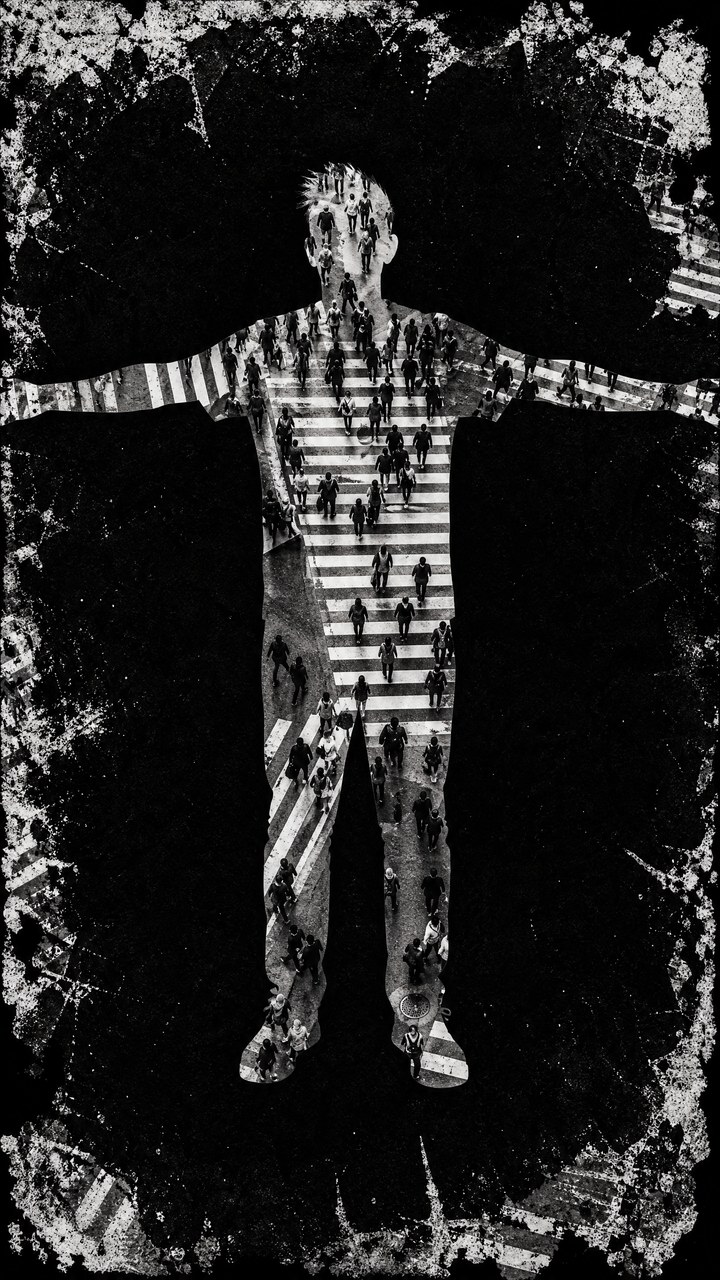
What happens. A black-and-white underground-style clip. Instead of a person there is a flat silhouette following their outline: hairstyle, shoulders, clothes. The silhouette bounces to the beat, and inside it a photograph changes every 1–3 frames: a passer-by's face, a building facade, a crossing from above, a subway train, a flash of white. Along the edges of the frame is a ragged photocopy border with splatter.
What we fixed. In the first version the photos inside the silhouette changed noticeably less often, while in the original they flicker almost every frame, which is why it hooks. The second lesson: in two runs Kling "froze" the silhouette at around the sixth second. We cut the template to 6 seconds, since the remaining seconds went to waste anyway.
Starting frame prompt:
```
Use the character sheet and photo(s) only for the body shape and the exact hairstyle outline of the person. Create one vertical BLACK-AND-WHITE experimental music-video frame. A LARGE FLAT CUTOUT SILHOUETTE of the person, full body, front view, filling about 80% of the frame height (head near the top, feet near the bottom edge), standing in a T-pose with both arms stretched out wide almost to the frame edges. The outline exactly follows their head, hairstyle, shoulders and clothes. The silhouette is a perfectly clean mask with NO body detail, NO face, NO clothing texture: inside it, filling the whole body as ONE LARGE readable black-and-white photograph, is a busy city crosswalk seen from above with pedestrians and wide zebra stripes. Outside the silhouette the background is deep BLACK with a heavy grungy photocopy border: thick torn black ink edges, ink spatter, grey speckle and scratches eating into the frame from all four sides, with fragments of the same city photo visible through the torn black edges. Very high contrast, heavy 16mm film grain, analog noise. No colour, no text, no logos, no watermarks.
```
Video prompt:
```
Experimental BLACK-AND-WHITE underground music video from @first_frame. FIXED frontal camera, no camera movement, no zoom. The figure stays LARGE (about 80% of the frame height) and is ALWAYS a FLAT CUTOUT SILHOUETTE MASK with the same outline — never a real lit body, never a visible face of the dancer, never clothing texture.
MOVEMENT: at 0.3 s the arms drop from the T-pose; then the silhouette dances small and loose for the whole shot — shoulder bounces, head nods, weight shifting from leg to leg, a hand to the chest, a half turn of the torso, hands into pockets and out again, a small step to the side. It keeps moving until the very last frame.
INSIDE THE MASK — CRITICAL: the fill is replaced with a hard cut EVERY 1 TO 3 FRAMES from the first second to the VERY LAST FRAME, never holding one fill longer than 3 frames. Each fill is ONE LARGE, READABLE black-and-white photograph scaled to the whole body: a giant close-up face of a passer-by in a hood filling the torso, a skyscraper facade, a crowded crosswalk from above, a graffiti brick wall, a subway platform with a passing train, rooftops and fire escapes, a skateboarder's sneakers, a night street with headlights — alternating with flat grey fills of different brightness and an occasional single-frame PURE WHITE flash. Every image is perfectly clipped to the moving outline and never spills outside.
OUTSIDE: deep black with a heavy torn photocopy ink border eating into the frame from all sides — spatter, grey speckle, scratches that flicker and shift every few frames; fragments of city photos show through the torn edges and change too.
STYLE: 16mm black-and-white analog, heavy grain, halftone and photocopy texture, frame jitter, imperfect registration, high contrast.
NEGATIVE: no colour, no real lit person, no dancer's face, no clothing texture, no small or distant figure, no fill held longer than 3 frames, no frozen ending, no crossfades, no camera movement, no multiple dancers, no glossy CGI, no text, no logos.
```
Price: about $1.38 (6 seconds of video — $1.14). Make City Silhouette with your own silhouette
5. Fluid Jump: flowing from corner to corner
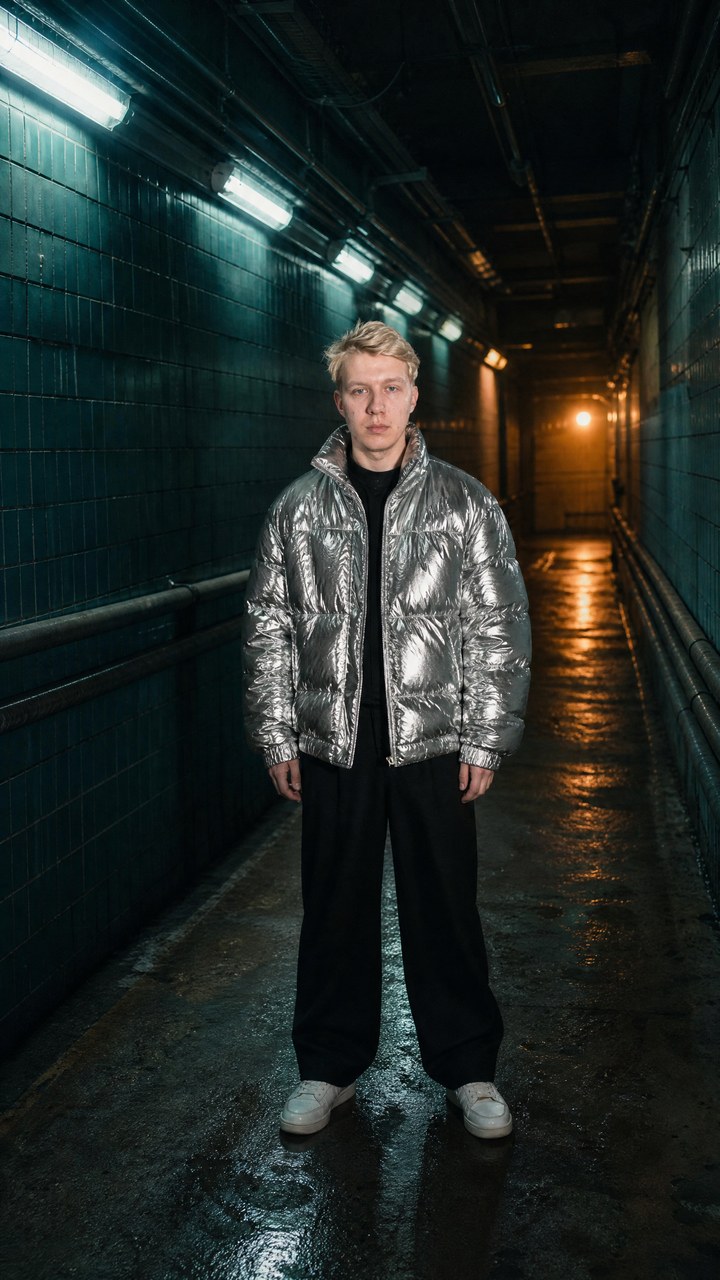
What happens. A dark service tunnel with fluorescent lamps. The hero, in a bulky silver jacket, "flows" from place to place three times: the body stretches into thick, shiny ribbons of liquid metal, flows to the wall, gathers back and leans a shoulder against it; flows again and crouches right by the camera; then leaves in a stream deep into the tunnel and in the finale turns around with a half-smile.
What we fixed. In an ordinary sweater the "liquid" came out matte and hard to read. In the guide the hero wears a silver puffer jacket, and that is not fashion but technique: a shiny, voluminous material gives the reflections by which the eye sees "liquid". We wrote the jacket straight into the starting frame. A remaining defect: for a fraction of a second the face can turn chrome, so "chrome face" is on the banned list.
Starting frame prompt:
```
Use the character sheet and photo(s): the EXACT same person, identical face, eyes, nose, lips, skin, age and hairstyle. Wardrobe for this shot: an OVERSIZED, VOLUMINOUS, GLOSSY METALLIC SILVER PUFFER BOMBER JACKET with big quilted folds that strongly reflect light, worn over a dark top, wide black trousers, sneakers. Create one ultra-photorealistic vertical cinematic film still for a hip-hop music video. Dark underground service corridor: dark teal tiled walls, long pipes along the walls, a diagonal row of cold fluorescent tubes on the upper left ceiling, a warm amber glow at the far end of the corridor, wet reflective concrete floor. The camera is at chest height in the middle of the corridor; the person stands in the center facing the camera, full body, hands at the sides, relaxed indifferent face, about 45% of the frame height, with empty space on the left wall, the right wall and down the corridor. Very low-key moody cinematic lighting, teal shadows and amber highlights, the silver jacket shining with cold highlights. 35mm film look, organic grain, soft halation, real skin texture, no CGI look. No text, no logos, no watermarks.
```
Video prompt:
```
Ultra-cinematic experimental hip-hop music video from @first_frame: the exact same person, face, hair, glossy metallic silver puffer jacket and black trousers, in this dark corridor. EXACTLY THREE LIQUID TELEPORTATIONS, extremely smooth, viscous and hypnotic, like a liquify tool applied to reality.
THE LOOK OF THE LIQUID — CRITICAL: the body never vanishes. The puffy silver jacket stretches first and most: it pulls out into long, thick, glossy LIQUID-METAL SILVER ribbons full of reflections, the black trousers into glossy black ribbons, skin and hair keep their own tones and the face stays a real face. The ribbons stay ONE CONNECTED ELASTIC STREAM from the start pose to the destination, the rough shape of the body still readable inside it. No droplets, no particles, no fragments.
0.0–0.5 s: he stands still in the center facing the camera.
0.5–1.2 s: his left sleeve stretches horizontally toward the LEFT wall like hot liquid metal, the jacket bulges and follows.
1.2–2.0 s: the whole body pours left into a thick silver-and-black stream and flows to the left wall in the FOREGROUND, close to the camera; the camera turns left following it.
2.0–3.2 s: he re-forms BIG in the left foreground, LEANING with one shoulder against the tiled wall, one knee bent, a hand in the pocket, indifferent face — HOLD still.
3.2–4.2 s: he melts again and pours DIAGONALLY down and to the right across the corridor in long silver ribbons; the camera pans right with the stream.
4.2–5.4 s: he re-forms in the RIGHT FOREGROUND very close to the lens in a LOW CROUCH, one hand on the wet floor, looking up with a challenging stare — HOLD.
5.4–6.8 s: the crouched body collapses into a low glossy stream that slides along the floor AWAY from the camera, deep down the corridor toward the amber light; the camera turns to look down the corridor from behind the stream.
6.8–8.0 s: the stream rises at mid-distance and rebuilds him standing in a three-quarter pose, his back half to the camera.
8.0–10.0 s: he adjusts the collar of the silver jacket and glances back at the camera with a subtle half-smile; the last silver strands retract into the jacket. HOLD.
STYLE: very dark teal corridor, fluorescent tubes, amber far light, reflections on the wet floor and on the liquid metal, 35mm film grain, soft halation, real cinema look.
NEGATIVE: no instant disappearance, no white or plain-coloured liquid, no chrome statue, no chrome face, no shattering, no particles, no duplicates of the person, no edit cuts, no identity change, no text, no logos.
```
Price: about $2.14. Make Fluid Jump with your own face
Three mistakes that cost us the most runs
The end of the clip freezes. In our runs Kling sometimes "got tired" by the last seconds: motion stops and the fill stops changing. There are two fixes: write "right up to the very last frame" in the prompt, and if that does not help, shorten the duration. There is no point paying for seconds that will end up as waste.
The hero is small and far away. If the person takes up 10% of the height in the starting frame, they will stay a dot in the video. The hero's size is set in step 2, not step 3.
"Similar" instead of "exact". Words like "fast", "dynamic" and "a lot" are understood by Kling in its own way. Numbers — "every 0.5 seconds", "three flows", "a 0.4-second dash, stop for a second" — it follows almost literally.
Who to sell this to and what it costs
The cost of one clip on the platform is $1.38–2.14. After that the question is not about the network but about who needs it. Here are four options:
- Contractor on orders. A striking clip for a musician, a host, a bar or a clothing shop is a typical short-video and editing order. How to work out your own price without fooling yourself is in the breakdown of what a video clip really costs.
- Specialist and expert. One such clip a week in Reels is a noticeable hook for your own blog: the viewer sees a familiar face in sixteen looks and watches to the end. How to turn such clips into a salary rather than one-off orders is in the article about the Reels manager.
- Business. An employee or founder in Multiverse is a ready-made brand ad without a shooting day. If someone else's face is in the frame, first read about face rights in advertising.
- For yourself. A gift for a friend with their face in sixteen worlds for $1.76 is also a perfectly good reason.
One rule from our practice: do not take someone else's photo without the person's consent. The template will happily make a clip with any face, but you are the one responsible for that.
Where to look next
- AI video generation in 2026: how it works and how to write a prompt — the basics, if the prompts above still look like spells.
- AI video models in 2026: what they really do and what actually sells — where Kling 4 is stronger than other models and where it is weaker.
- Hollywood for $0: four film special effects with neural networks — the same approach to effects, but for film.
- How to keep one hero across a series of frames — more on the character card and why the face "drifts".
- Digital avatar: how to make content without filming anything — if you need a talking clip rather than an effect.
The templates are open on every plan, including the free one: you need an account and a balance, each step is paid for as it is used, and the minimum top-up is $5. If you want to build your own effect from scratch, Gen AI has the same models: GPT Image 2 for frames and Kling 4.0 Keyframes for video. The prompts from this article go in there as they are, and the starting frame is attached as an image.
An assignment for tonight
Take one photo of yourself and make Multiverse. It is the simplest of the five templates and the most "viral": the face is in the centre, and there is nothing to invent. Then open the clip frame by frame (in any player, with the right arrow) and look for at least one frame where the face stopped being yours. If there are no such frames, the template works. If there are, you have just learned the main skill of video with neural networks: looking at every frame.
FAQ
What is a video template in a neural network?
It is a ready-made effect where your face is substituted in: from your photo the network makes a character card, then a starting frame of the scene, then a video model brings the frame to life using a prompt that has already been tuned. You do not need to write prompts yourself — you just upload a photo.
How much does a clip from a Kling 4 template cost?
From $1.38 to $2.14 per clip depending on length: the character card and the starting frame are $0.12 each, and Kling 4.0 Keyframes video is $0.19 per second. The money is taken from your platform balance as each step is completed, and no Kling subscription is needed.
Why doesn't the face in the clip look like mine?
Most often the source photo is to blame: the face in profile, in glasses, in shadow or too small. The best results come from 2–3 front-facing photos in daylight.
Can I use the prompts from the article in another service?
Yes. The prompts are written for GPT Image 2 and Kling 4 and work wherever those models are available. The @first_frame tag in the video prompt is a reference to the starting frame; in another interface you replace it with the attached image.
Can I sell clips made from the templates?
Clips with your own face, or with the face of a client who has given consent, yes. The effects are conceived as a genre and are not tied to anyone else's characters. You must not take someone else's face without consent: in advertising it is a direct risk of a legal claim.
Want to know which video models actually bring in orders and which only look good? Message the bot the word МОДЕЛИ (Russian for “models”) — I will send you the breakdown "AI video models in 2026: what they really do and what actually sells": https://t.me/consultant_ai_skills_bot?start=MODELI_blog