How to remove something unwanted from a photograph
A good shot with strangers in it, a finger in the corner or a wheelie bin. Removing is only half the work: the other half is what has to be rebuilt in the space left behind. Below is a real run with two tasks at once.
A good shot with strangers in it, a finger in the corner or a wheelie bin. Removing is only half the work: the other half is what has to be rebuilt in the space left behind. Below is a real run with two tasks at once.
---
If there is no time to read: five steps
1. Name what to remove specifically — "the woman in the hat on the left", not "the extra people".
2. List separately what not to touch. A model will happily "correct" small details of clothing and jewellery.
3. Do not write the request yourself — upload the photo to an assistant and ask it to compose it for you.
4. You can extend the frame at the same time — if the object stood at the edge, adding space is easier than cutting it out.
5. Look at the boundaries and the shadows, not the overall view. That is where you see whether it came out clean.
---
Why a good shot goes unused
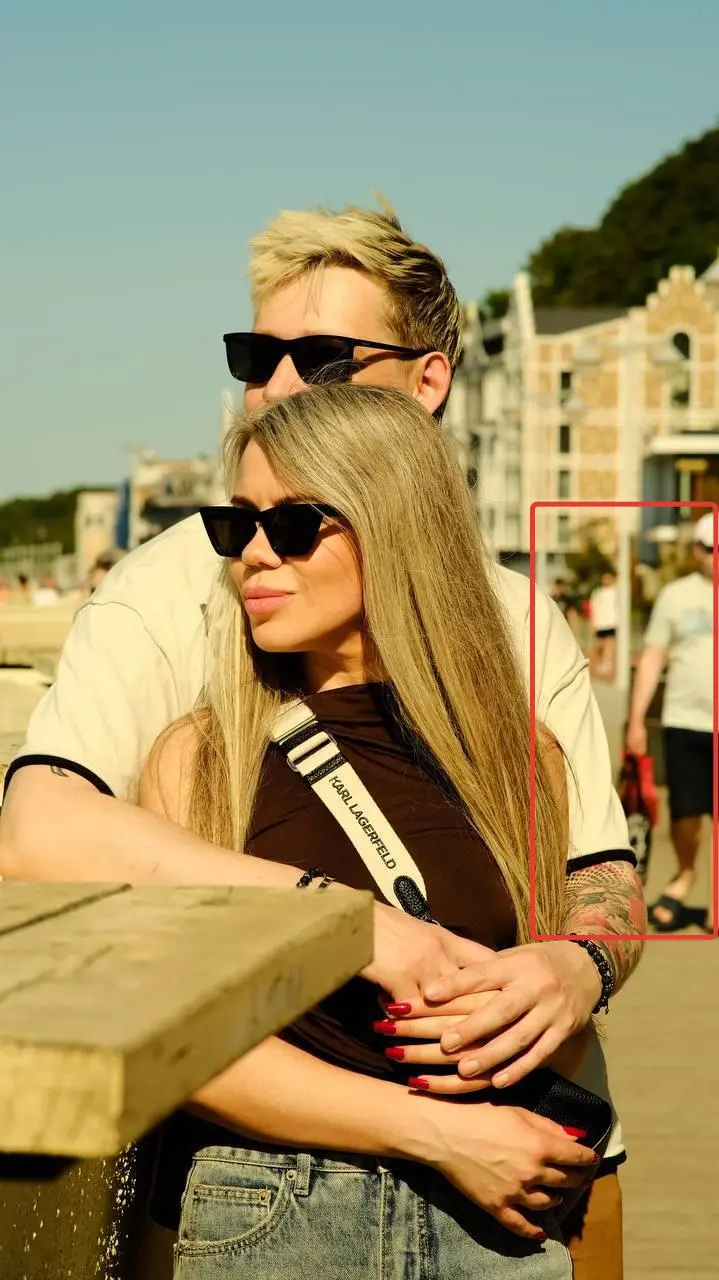
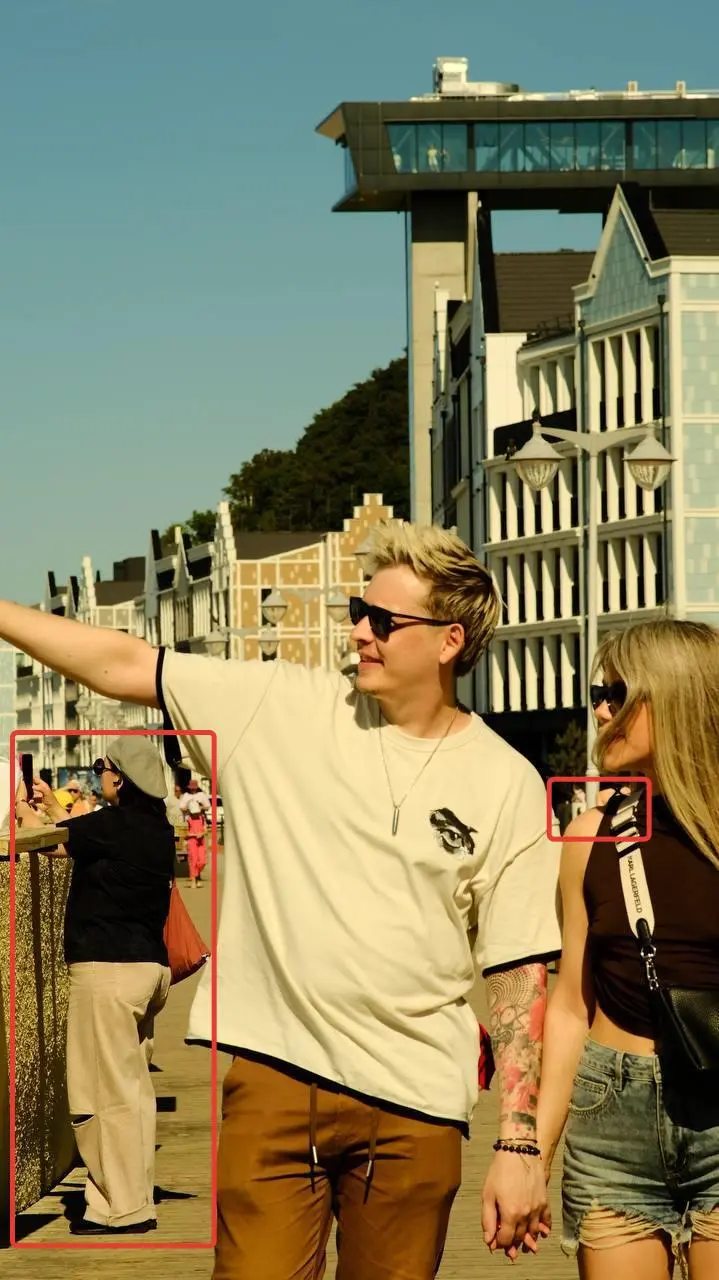
A holiday photograph. Two people on a seafront, sunshine, old European buildings in the background, a wooden boardwalk underfoot.
The shot is a good one — and unusable. Strangers are walking along the promenade: a woman in a hat on the left, somebody in red, a few more figures further along. They did not matter at the moment of shooting and they matter now: the eye catches on them rather than on the people the photo was taken for.
Plus the format. It was shot horizontally and a vertical one is needed — for printing, for a profile, for a frame. Cropping kills the composition: crop it vertically and half the seafront with the buildings goes.
Usually that is where it ends. The photograph stays in the gallery as it is, and a different one goes on the wall — worse, but without the strangers.
Meanwhile both tasks are solved by one request. Below is how.
---
Who I am and what I removed from photos
I have been working with AI for five years, since 2019.
What follows is a real run. I show the original, the full text of the request and the result. The point here is not the pictures but what was written in the request: that is where the difference lies between clean work and a visible patch.
The original · the second frame
---
Removing is actually two tasks
Before going through the steps, here is the main thing that makes most attempts come out badly.
Removing an object is easy. What is hard is what remains in its place.
A person stood against a wooden boardwalk, a wall and buildings in the distance. Remove them and a hole appears in the frame that has to be filled with a continuation of the boardwalk, the wall and the buildings — preserving perspective, shadows and the texture of the wood.
That is where things fail. The boards do not line up. A shadow falls the wrong way. A piece of wall differs in shade. From a distance it looks fine, and enlarged you can see the patch.
Hence the rule: the request has to describe not only what to remove but what to fill it with. And that is the second reason not to write the request yourself.
---
Step 1. What I wrote
One line. Word for word:
> "Here is a new photo. It needs extending to the left (3:4 format) and the people in the background removed. Leave everything else as in the original."
I gave that to the prompt assistant along with the photograph.
Note that I set two tasks at once — remove the people and extend the frame to the left into a vertical format. That is more convenient than doing it in two passes: the model sees the whole picture and builds it out consistently.
---
Step 2. What the assistant wrote
It analysed the shot and composed a request in four parts. I will go through each, because it is a ready template for any case like this.
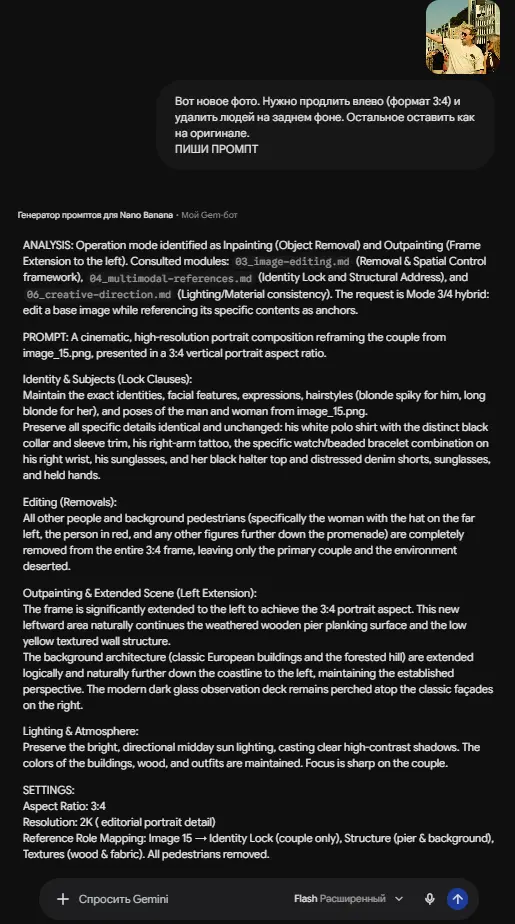
#### Part one: what to protect
The longest part, and it is not about removal.
Preserve the exact identities, facial features, expressions, hairstyles and poses of both. And then, item by item, exactly what not to touch:
The man's white polo shirt with black trim on the collar and sleeves. The tattoo on his right arm. The specific combination of watch and beaded bracelet on his right wrist. The sunglasses. The woman's black top and denim shorts with distressing. Their joined hands.
Why such pedantry. Everything listed is what a model will happily "correct". A tattoo turns into a smudge, a bracelet disappears, collar trim goes plain. Every small thing named explicitly stays where it is.
#### Part two: what to remove
Not "the extra people" but specifically: the woman in the hat on the left, the person in red and the other figures further along the promenade.
Why naming them individually matters. "Remove the people in the background" is vague, and the model decides for itself who is surplus here. It may remove the wrong ones or leave somebody.
#### Part three: what to fill it with
That second half of the task.
Extend the frame to the left into a vertical format. The new area naturally continues the boards of the wooden walkway and the low yellow wall. The architecture in the background — old European buildings and a wooded hill — continues logically along the coast, preserving perspective. The modern dark glass viewing platform stays in its place on the right above the façades.
That is what makes a result clean. Not "draw something on the left" but a list of exactly what should continue and how.
#### Part four: the light
Preserve the bright midday sun with sharp contrasting shadows. The colours of the buildings, the wood and the clothing — unchanged. Sharpness on the couple.
Without that clause the reconstructed part of the frame often comes out with different light — and that is exactly what shows the frame was edited.
---
Step 3. Generation
I copied the finished request and pasted it into the generation section — Gen AI, the "Photo editor" mode, the GPT Image 2 model. Format 3:4, resolution 2K, high quality.

The cost — $0.15. The price is visible before you press, and if a generation did not work, the money returns to the balance automatically.
The results: the first · the second
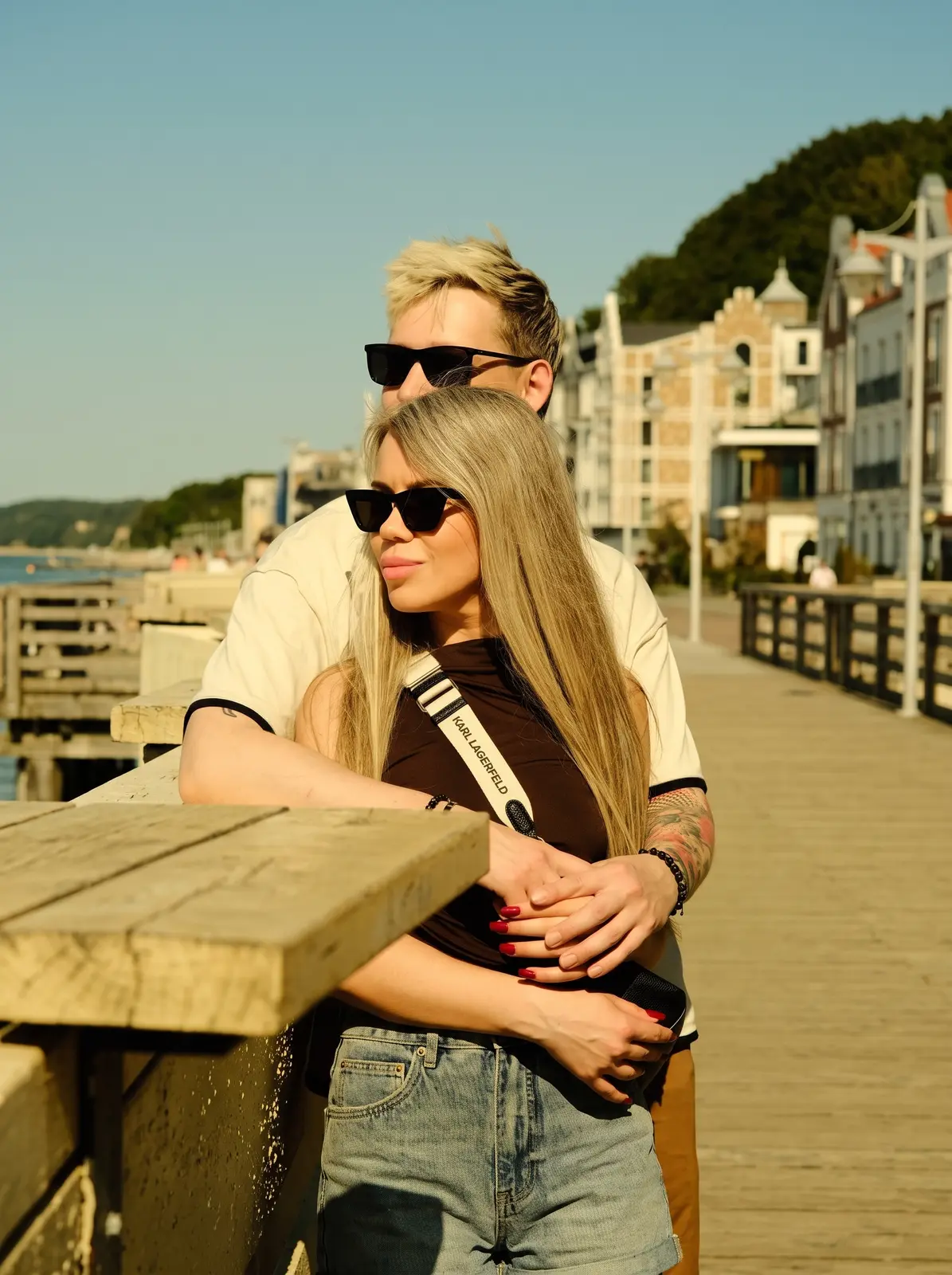
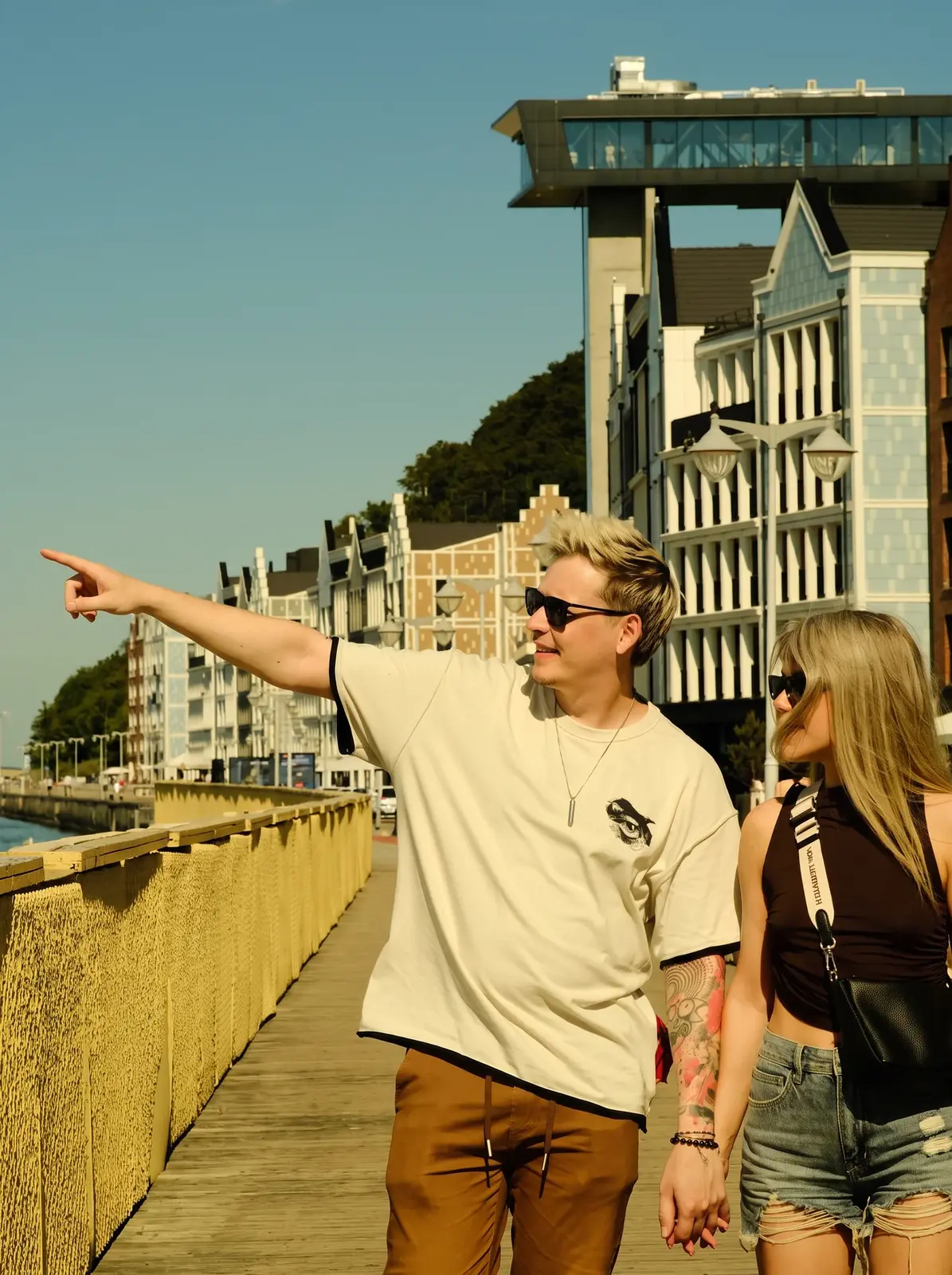
There were two runs — at fifteen cents it is cheaper to make several versions and choose than to keep refining one.
---
What to look at when judging the result
Not the overall view. Enlarge it and check four places.
The boundaries where the object stood. The most common point of failure. Lines should continue with no break: boards, tiles, brickwork, the join between wall and floor.
Shadows. If the object cast a shadow, it should disappear along with it. A leftover shadow from a non-existent person is a sure sign.
Repeating textures. A model sometimes fills a space with a copy of the neighbouring area. The same pattern twice in a row is noticeable.
The small details you asked to preserve. The tattoo, the bracelet, the collar trim. Check they are in place and unchanged.
---
What people remove most often
Five typical cases — the same scheme for each.
Strangers in the background — the most common. A holiday, a landmark, a promenade.
An ex or an unwanted person in the frame. A separate task: there you have to not merely remove them but rebuild what they were covering — often half of another person.
Clutter and equipment. Cables, a bin, an air conditioner on a wall, a parked car.
A finger, a strap, the edge of a case in the corner of the frame.
Lettering and logos — on clothing, on a sign, a watermark.
And one limitation. The more area the object occupies and the more complex what is behind it, the harder it gets. A person against a plain wall is removed perfectly. A person covering half an ornamental pattern, with difficulty.
---
What to do if the object was removed badly
A mess where the object was. Describe more precisely what should be there: "continue the brick wall in the same shade", "rebuild the wooden boardwalk preserving the direction of the boards".
It removed the wrong thing or not everybody. Name the objects individually, with identifying features: "the man in the red T-shirt to the right of the lamp post".
Details changed that you did not ask to be touched. Add them to the protected list — explicitly and as a list.
A seam is visible at the frame boundary when extending. Ask for specific elements to be continued rather than "extend the background".
The general rule: do not rewrite the request yourself. Tell the assistant what went wrong — correcting the wording is its job.
---
And what I did not do myself
I did not write a single word of that request. I uploaded the photo and explained the task in one line of ordinary language.
Everything else — including the mention of the beaded bracelet and the collar trim, which I would never have thought of — was composed by the assistant.
There are more than 150 of them in the catalogue, across fourteen sections: for every task and every model. You choose not "what to do it with" but "what I need to get".
Access is the basic subscription.
And the prompt library holds ready templates, open free after ordinary registration. If you want to try with no outlay, that is where to start.
---
Where to start today
One action, ten minutes.
Open your gallery and find a shot you like that is spoilt by something. There almost certainly is one — with strangers in the background, with cables, or with a finger in the corner.
Upload it to the assistant and write in one line what to remove and what to leave as it is.
Send the text you get to the generation section.
Did it work? Take a second frame. The second takes a couple of minutes, because the route is already clear. And then try changing the format at the same time — a vertical from a horizontal is made with the same request.
What else is in the same section. Besides editing by description, there is a separate button for background removal (the object stays, the background goes) and resolution increase, if the frame is small and no good for printing. Each operation costs from 12 cents, and the price is visible before you press.
Registration is free and opens three days of full access.
---
What to read next
[Restoring an old photograph](/en/blog/restore-old-photo) — if the print is damaged rather than merely containing something unwanted.
[A digital avatar: content with no filming](/en/blog/digital-avatar-without-filming) — what else is made from ordinary photographs.
[Where to start: one evening, one task](/en/blog/first-evening-one-task) — if this is your first approach to the subject.
[Where does what I write to an AI go](/en/blog/is-it-safe-to-use-ai) — if uploading personal photographs is off-putting.
---